
PL-100 · Question #45
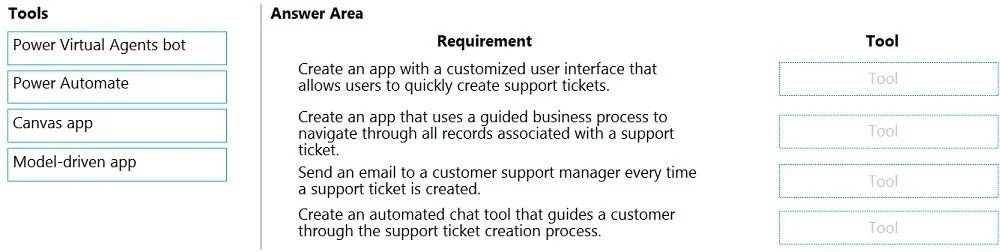
Drag and Drop Question You plan to create apps for a company. You need to identify the Power Platform tools required. What should you use? To answer, drag the appropriate tools to the correct…
The correct answer is Canvas app; Model-driven app; Power Automate; Power Virtual Agents bot. The question assesses the ability to correctly identify and apply the appropriate Microsoft Power Platform tool - Canvas app, Model-driven app, Power Automate, or Power Virtual Agents - to various business application and automation requirements.
Question
Exhibit
Answer Area
Drag items
Correct arrangement
- Canvas app
- Model-driven app
- Power Automate
- Power Virtual Agents bot
Explanation
The question assesses the ability to correctly identify and apply the appropriate Microsoft Power Platform tool - Canvas app, Model-driven app, Power Automate, or Power Virtual Agents - to various business application and automation requirements.
Approach. To answer correctly, each tool must be dragged to the requirement that best matches its primary functionality:
-
Requirement: 'Create an app with a customized user interface that allows users to quickly create support tickets.'
- Correct Tool: 'Canvas app'
- Reasoning: Canvas apps offer complete control over the user interface and experience, allowing for highly customized, pixel-perfect designs, making them ideal for creating specific task-oriented apps like a quick support ticket entry form.
-
Requirement: 'Create an app that uses a guided business process to navigate through all records associated with a support ticket.'
- Correct Tool: 'Model-driven app'
- Reasoning: Model-driven apps are built on top of data (typically Dataverse) and automatically generate the UI based on the data model and business processes. They excel at managing complex data, business process flows, and relationships between records, providing a structured, guided experience for users to navigate data.
-
Requirement: 'Send an email to a customer support manager every time a support ticket is created.'
- Correct Tool: 'Power Automate'
- Reasoning: Power Automate is designed for automating workflows and tasks. Sending an email in response to an event (like a new support ticket being created) is a core capability of Power Automate, often using its extensive connector library.
-
Requirement: 'Create an automated chat tool that guides a customer through the support ticket creation process.'
- Correct Tool: 'Power Virtual Agents bot'
- Reasoning: Power Virtual Agents is specifically developed for creating AI-powered chatbots that can engage in conversational experiences, guiding users through processes, answering questions, and performing actions like creating support tickets.
Common mistakes.
- common_mistake. Common mistakes include confusing Canvas apps with Model-driven apps. For instance, using a Model-driven app for a 'customized user interface' is incorrect because Canvas apps provide pixel-perfect control, whereas Model-driven apps generate UI based on data and process. Similarly, using a Canvas app for a 'guided business process to navigate through all records' is wrong because Canvas apps are generally less suited for complex data navigation and structured business process flows compared to Model-driven apps built on Dataverse. Attempting to use Power Automate to create a chat tool or a full app, or using Power Virtual Agents to send emails directly, would also be incorrect, as these tools have distinct purposes within the Power Platform ecosystem. Each tool is designed for specific functionalities, and interchanging them for inappropriate requirements demonstrates a lack of understanding of their core capabilities.
Concept tested. The core concept being tested is the understanding of the distinct roles, capabilities, and best-fit scenarios for the key components of Microsoft Power Platform: Power Apps (differentiating between Canvas apps and Model-driven apps), Power Automate, and Power Virtual Agents.
Topics
Community Discussion
No community discussion yet for this question.