
PL-100 · Question #319
Drag and Drop Question You create a canvas app. You run App checker to validate the app. App checker returns error results. You need to locate where the errors occur. Which areas should you review?…
The correct answer is Formula; Formula; Accessibility. This question assesses the ability to categorize Power Apps App checker errors into their respective areas (Formula, Accessibility) to facilitate troubleshooting in a canvas app.
Question
Exhibit
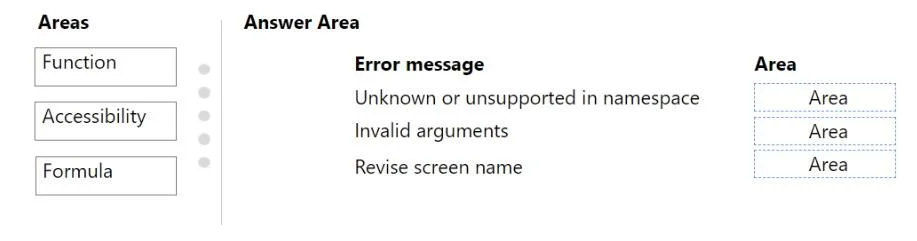
Answer Area
Drag items
Correct arrangement
- Formula
- Formula
- Accessibility
Explanation
This question assesses the ability to categorize Power Apps App checker errors into their respective areas (Formula, Accessibility) to facilitate troubleshooting in a canvas app.
Approach. The correct interaction is to drag 'Formula' to both 'Unknown or unsupported in namespace' and 'Invalid arguments', and 'Accessibility' to 'Revise screen name'.
- Unknown or unsupported in namespace: This error occurs when a function name, variable, or control reference used within a Power Fx expression (formula) is not recognized or does not exist in the current scope. This is a fundamental formula-related issue.
- Invalid arguments: This error indicates that a function within a formula is being called with parameters that are of the wrong type, incorrect number, or do not conform to the function's expected signature. This is also a direct consequence of an improperly constructed formula.
- Revise screen name: This error typically arises from accessibility checks within App checker. It suggests that the name of a screen or other UI element is not descriptive enough or follows conventions that hinder accessibility (e.g., for screen readers). Ensuring descriptive and accessible names is a key part of accessibility best practices in Power Apps.
Common mistakes.
- common_mistake. A common mistake would be to use 'Function' as an area. While 'Unknown or unsupported in namespace' and 'Invalid arguments' are related to functions, 'Formula' is the broader and more accurate category in Power Apps for syntax and semantic errors detected during formula evaluation. The App checker categorizes these errors under 'Formulas'. Misinterpreting 'Revise screen name' as a general naming convention issue rather than specifically an accessibility concern would also lead to an incorrect answer, as App checker flags these under accessibility to ensure the app is usable by all users, including those with disabilities.
Concept tested. Understanding and classifying different types of errors reported by the Power Apps App checker, specifically distinguishing between formula-related errors (syntax, function arguments, references) and accessibility issues (naming conventions for screen readers and usability).
Reference. null
Topics
Community Discussion
No community discussion yet for this question.