
Microsoft
PL-100 · Question #32
You create a canvas app within a Power Platform environment. You need to identify potential accessibility issues for the canvas app before making the app available to other users. Which tool should…
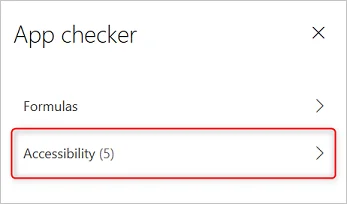
The correct answer is B. App Checker. Find accessibility issues 1. In the upper-right corner of Power Apps Studio, select the icon for the App checker. 2. In the menu that appears, select Accessibility. A list of issues appears, sorted first by severity and then by screen…
Create business solutions
Question
You create a canvas app within a Power Platform environment. You need to identify potential accessibility issues for the canvas app before making the app available to other users. Which tool should you use?
Exhibit
Options
- APortal Checker
- BApp Checker
- CSolution Checker
How the community answered
(41 responses)- A2% (1)
- B88% (36)
- C10% (4)
Explanation
Find accessibility issues 1. In the upper-right corner of Power Apps Studio, select the icon for the App checker. 2. In the menu that appears, select Accessibility. A list of issues appears, sorted first by severity and then by screen. https://docs.microsoft.com/en-us/powerapps/maker/canvas-apps/accessibility-checker
Topics
#Canvas Apps#Accessibility#App Checker#Power Platform Tools
Community Discussion
No community discussion yet for this question.