
PL-100 · Question #48
Drag and Drop Question You have a solution that contains a Power Automate flow, an environment variable, and a model- driven app. Which three steps should you perform in sequence? To answer, move…
The correct answer is Select the unmanaged solution.; Publish all changes.; Adjust the version number. The correct sequence for preparing a Power Platform solution for export or update involves working within an unmanaged solution, ensuring all changes are published, and then updating the version number for proper lifecycle management.
Question
Exhibit
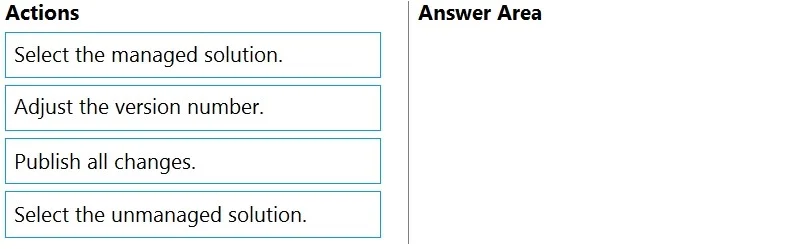
Answer Area
Drag items
Correct arrangement
- Select the unmanaged solution.
- Publish all changes.
- Adjust the version number.
Explanation
The correct sequence for preparing a Power Platform solution for export or update involves working within an unmanaged solution, ensuring all changes are published, and then updating the version number for proper lifecycle management.
Approach. The correct interaction is to drag 'Select the unmanaged solution.', 'Publish all changes.', and 'Adjust the version number.' into the 'Answer Area' in that specific order.
- Select the unmanaged solution. - When developing or making changes to a Power Platform solution (which includes flows, environment variables, and apps), you always work within an unmanaged solution in a development environment. Managed solutions are for deployment to target environments, not for active development or modification.
- Publish all changes. - After making modifications to solution components such as model-driven apps, forms, views, charts, or sitemaps, it's crucial to publish all changes. This action ensures that the changes are saved, become active in the current environment, and are included when the solution is exported.
- Adjust the version number. - Before exporting a solution (especially if it's an updated version intended for deployment as a managed solution), it's a best practice to increment the solution's version number. This allows for proper tracking of updates, facilitates solution upgrades in target environments, and provides a clear history of changes.
Common mistakes.
- common_mistake. A common mistake would be to start with 'Select the managed solution.' This is incorrect because managed solutions are deployment packages; you do not make development changes directly within a managed solution. Another mistake would be to place 'Adjust the version number' before 'Publish all changes.' While the exact moment of version adjustment can sometimes vary slightly, the most logical flow for preparing a solution is to finalize and publish all current changes first, and then increment the version number to signify that this complete set of changes is ready for export and deployment. Not including 'Publish all changes' would be a significant error, as many Power Platform components require explicit publishing for changes to take effect and be included in the solution export.
Concept tested. Power Platform solution lifecycle management, understanding of unmanaged vs. managed solutions, the importance of publishing changes, and solution versioning for updates and deployment.
Reference. null
Topics
Community Discussion
No community discussion yet for this question.