
PL-100 · Question #49
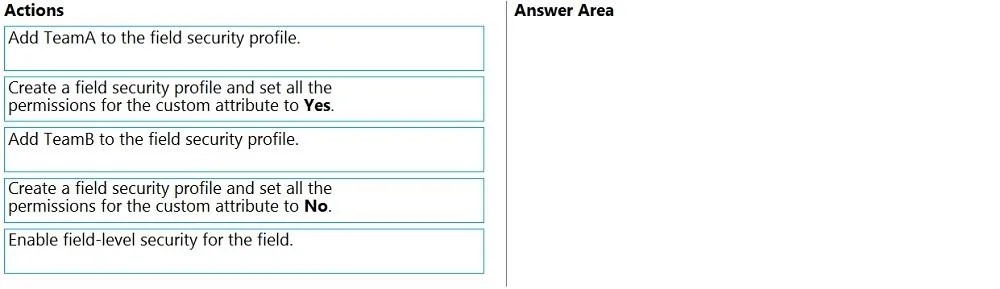
Drag and Drop Question You create a custom field on the Account entity. Members of TeamA must have full access to the field. Members of TeamB must have no access to the field. You need to configure…
The correct answer is Enable field-level security for the field.; Create a field security profile and set all the permissions for the custom attribute to Yes.; Add TeamA to the field security profile. To secure a custom field with different access levels for two teams, first enable field-level security on the field, then create a security profile granting full access, and finally assign this profile to the team requiring full access.
Question
Exhibit
Answer Area
Drag items
Correct arrangement
- Enable field-level security for the field.
- Create a field security profile and set all the permissions for the custom attribute to Yes.
- Add TeamA to the field security profile.
Explanation
To secure a custom field with different access levels for two teams, first enable field-level security on the field, then create a security profile granting full access, and finally assign this profile to the team requiring full access.
Approach. The correct interaction is to drag the following three actions into the 'Answer Area' in the specified order:
- Enable field-level security for the field. This is the foundational step. Field-level security must be explicitly enabled for a specific field before any field security profiles can control access to it. Without this, the field's security will be governed by entity-level security roles.
- Create a field security profile and set all the permissions for the custom attribute to Yes. To grant full access to TeamA, a field security profile needs to be created that explicitly defines the desired access (read, create, update) for the custom field. Setting permissions to 'Yes' grants full access.
- Add TeamA to the field security profile. Once the profile granting 'Yes' permissions is created, TeamA must be added to this profile. This links TeamA to the defined access levels for the field.
The requirement for TeamB (no access) is implicitly met. If a user or team is not part of a field security profile that grants access to a field for which field-level security is enabled, they will automatically have no access to that field. Therefore, no explicit 'deny' profile or assignment for TeamB is needed to fulfill the 'no access' requirement in this specific three-step scenario.
Common mistakes.
- common_mistake. A common mistake would be to include 'Create a field security profile and set all the permissions for the custom attribute to No.' or 'Add TeamB to the field security profile.'. While you could create a specific 'no access' profile for TeamB, it is not strictly necessary to achieve 'no access' when field-level security is enabled. Users/teams not explicitly granted access via a profile for an FLS-enabled field will inherently have no access. The question asks for the three sequential actions, and the explicit denial for TeamB is redundant in this context of needing only three steps to achieve both requirements. Another mistake would be to add TeamA to a profile before the profile itself is created, or before field-level security is enabled on the field, which would break the logical flow of configuration.
Concept tested. Microsoft Dynamics 365 field-level security configuration, including enabling security on a field, creating field security profiles, and assigning users/teams to these profiles to control granular access to specific attributes.
Topics
Community Discussion
No community discussion yet for this question.