
PL-100 · Question #73
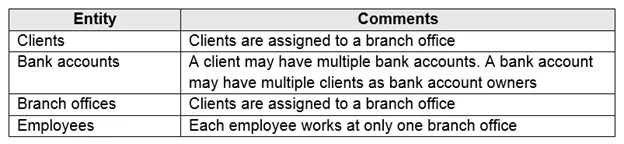
Drag and Drop Question You are designing an app for a bank. You plan to use the following entities in the app: You need to configure the relationships between the entities. Which relationship types…
The correct answer is Many-to-many; Many-to-one; One-to-many. This question tests the ability to determine correct database relationship types (one-to-one, one-to-many, many-to-one, many-to-many) based on provided business rules for entities.
Question
Exhibit
Answer Area
Drag items
Correct arrangement
- Many-to-many
- Many-to-one
- One-to-many
Explanation
This question tests the ability to determine correct database relationship types (one-to-one, one-to-many, many-to-one, many-to-many) based on provided business rules for entities.
Approach. The correct interaction involves dragging the appropriate relationship type from the left panel to each of the three blank 'Relationship type' drop zones in the Answer Area, based on the rules in the 'Entity Comments' table.
-
Clients - Bank accounts: The comments state, 'A client may have multiple bank accounts. A bank account may have multiple clients as bank account owners.' This clearly defines a situation where multiple clients can be associated with multiple bank accounts, and vice-versa. Therefore, drag 'Many-to-many' to the 'Clients - Bank accounts' relationship.
-
Clients - Branch offices: The comments state, 'Clients are assigned to a branch office.' This implies that a single client is assigned to only one branch office. However, a single branch office can have multiple clients assigned to it. Since the source entity is 'Clients' and the target entity is 'Branch offices', many clients can be assigned to one branch office. Therefore, drag 'Many-to-one' to the 'Clients - Branch offices' relationship.
-
Branch offices - Employees: The comments state, 'Each employee works at only one branch office.' This means a single employee is associated with only one branch office. Conversely, a single branch office can have multiple employees working there. Since the source entity is 'Branch offices' and the target entity is 'Employees', one branch office can have many employees. Therefore, drag 'One-to-many' to the 'Branch offices - Employees' relationship.
The final configuration will show 'Clients - Bank accounts' as Many-to-many, 'Clients - Branch offices' as Many-to-one, and 'Branch offices - Employees' as One-to-many.
Common mistakes.
- common_mistake. Common mistakes include confusing the direction of one-to-many versus many-to-one relationships. For example, for 'Clients - Branch offices', if one considers that a branch office has many clients, one might incorrectly choose 'One-to-many' from the perspective of the branch office. However, the question specifies 'Clients' as the Source entity and 'Branch offices' as the Target entity, meaning we evaluate how many clients relate to how many branch offices from the client's perspective (many clients to one branch). Another mistake is misinterpreting 'multiple' as always implying 'many-to-many' without considering the full scope of both sides of the relationship. For instance, if an employee works at only one branch, it's not many-to-many, even if the branch has many employees. One-to-one is rarely used in real-world scenarios for entities like these, and selecting it would imply a very strict, usually incorrect, relationship like 'each client has exactly one bank account and each bank account has exactly one client'.
Concept tested. Database Relationship Types (One-to-one, One-to-many, Many-to-one, Many-to-many) in Entity-Relationship (ER) modeling and database design.
Topics
Community Discussion
No community discussion yet for this question.