
PL-100 · Question #74
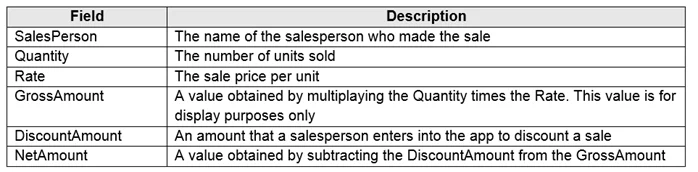
Drag and Drop Question You are creating entities in a Common Data Service database to capture sales data. You create an entity named Sales that includes the following fields: You create a new entity…
The correct answer is Calculated; Simple; Rollup. The question assesses the ability to differentiate between Dataverse field types (Simple, Calculated, and Rollup) based on how their values are derived or aggregated in a sales data scenario.
Question
Exhibit
Answer Area
Drag items
Correct arrangement
- Calculated
- Simple
- Rollup
Explanation
The question assesses the ability to differentiate between Dataverse field types (Simple, Calculated, and Rollup) based on how their values are derived or aggregated in a sales data scenario.
Approach. To answer correctly, one must understand the functionality of each field type:
-
GrossAmount: The description states, 'A value obtained by multiplying the Quantity times the Rate.' This indicates a value that is automatically computed based on other fields within the same record. This precisely matches the definition of a Calculated field. A calculated field stores a value that is automatically computed from other fields, expressions, or static values.
- Interaction: Drag 'Calculated' to 'GrossAmount'.
-
DiscountAmount: The description states, 'An amount that a salesperson enters into the app to discount a sale.' This implies direct user input, meaning the value is manually provided and stored as-is. This aligns with a Simple field, which is used for direct data entry and storage without automated calculation or aggregation.
- Interaction: Drag 'Simple' to 'DiscountAmount'.
-
TotalSales: The question text specifies that 'The field is used to capture the aggregated sales for each salesperson.' The term 'aggregated sales' for each salesperson implies summing or counting values from multiple related sales records (e.g., all sales associated with a particular salesperson). This is the primary function of a Rollup field, which aggregates data from related records and displays a summarized value on the parent record.
- Interaction: Drag 'Rollup' to 'TotalSales'.
Common mistakes.
- common_mistake. A common mistake is confusing the scope of calculations. Using 'Rollup' for 'GrossAmount' would be incorrect because 'GrossAmount' is derived from fields within the same sales record (Quantity, Rate), not an aggregation across multiple related records. Conversely, using 'Calculated' for 'TotalSales' would be incorrect because 'TotalSales' requires aggregation across many related sales records for a salesperson, a task specifically designed for 'Rollup' fields, not standard 'Calculated' fields which primarily operate within a single record or directly related one-to-one fields. Assigning 'Simple' to 'GrossAmount' or 'TotalSales' would also be wrong because these fields are explicitly described as derived or aggregated, not as values entered directly by a user or stored statically without any underlying logic.
Concept tested. Understanding and applying the different types of fields in Microsoft Dataverse (formerly Common Data Service), specifically: Simple fields (for direct data entry), Calculated fields (for intra-record calculations), and Rollup fields (for inter-record aggregations).
Reference. https://learn.microsoft.com/en-us/power-apps/maker/data-platform/types-of-fields
Topics
Community Discussion
No community discussion yet for this question.