
PL-100 · Question #77
Drag and Drop Question You are an app maker for a college. You create an app for student enrollment. The app captures the education level of the applicants. The education level at the time of…
The correct answer is Open the maker app and navigate to the student table; Create new options for College - 1 Year and College - 2 years; Save the student table. The user needs to modify a Dataverse option set by adding new options, which involves navigating to the table, creating the options, and saving the table definition.
Question
Exhibit
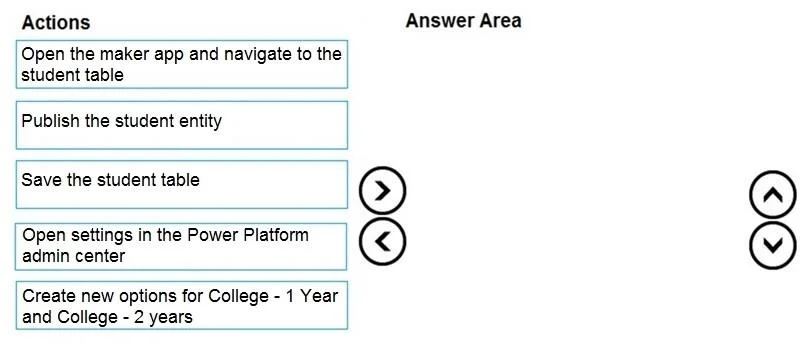
Answer Area
Drag items
Correct arrangement
- Open the maker app and navigate to the student table
- Create new options for College - 1 Year and College - 2 years
- Save the student table
Explanation
The user needs to modify a Dataverse option set by adding new options, which involves navigating to the table, creating the options, and saving the table definition.
Approach. The correct interaction is to drag the following three actions into the answer area in this specific order:
- Open the maker app and navigate to the student table: This is the essential initial step to access and modify any Dataverse table (entity) within the Power Apps maker portal. You must first be in the correct context to make changes.
- Create new options for College - 1 Year and College - 2 years: Once you have navigated to the student table, you would then locate the 'education level' column (which is an option set or choice column) and proceed to add these two new choices to its list of options. This directly addresses the problem statement of 'creating the two option sets'.
- Save the student table: After adding new options to a choice column, the changes made to the table's schema (metadata) need to be explicitly saved. This action ensures that the new options are persisted in the table's definition within the Dataverse environment. While 'Publish the student entity' is often a subsequent step to make schema changes live and available in apps, 'Save the student table' is a distinct and necessary action to commit the structural modifications.
Common mistakes.
- common_mistake. 1. Including 'Publish the student entity' instead of 'Save the student table': Although publishing is a crucial step to make schema changes available to end-users and applications, 'Save the student table' is a prerequisite or a distinct step that persists the metadata changes before they can be published. Given the options and the requirement for only three actions for 'creating' the option sets, saving the table defines their existence in the schema, making it the more fundamental third step compared to publishing which deploys these changes.
- Including 'Open settings in the Power Platform admin center': This action is incorrect because the Power Platform admin center is primarily for environment-level administration, capacity management, user licensing, and other high-level configurations, not for directly modifying Dataverse table schemas or column definitions. Table and column modifications are performed within the Power Apps maker portal.
- Incorrect order of actions: Any deviation from the sequence of 'navigate' -> 'create' -> 'save' would be illogical and technically impossible. For example, trying to create options before navigating to the table, or saving changes before they have been made, would fail.
Concept tested. Dataverse table and column (option set/choice) modification, understanding the Power Apps maker portal navigation, and the correct sequence of actions for implementing schema changes (edit column, save table).
Topics
Community Discussion
No community discussion yet for this question.