
PL-100 · Question #78
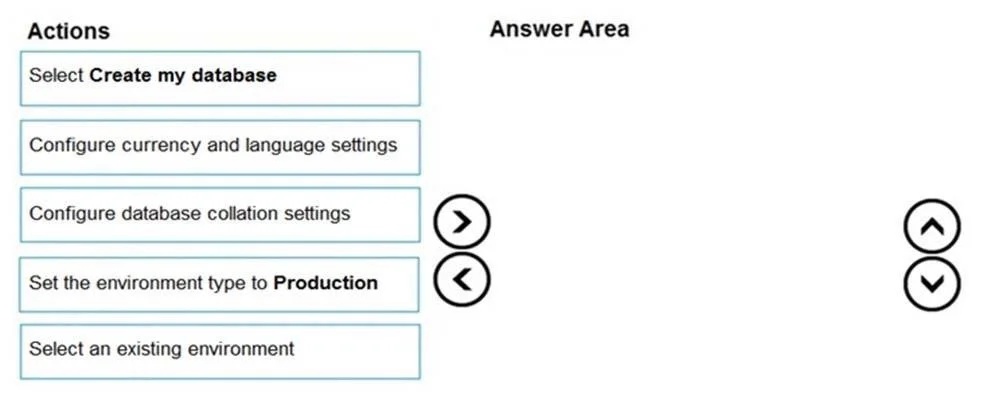
Drag and Drop Question You have an existing Power Apps environment. You need to create a Microsoft Dataverse database for the environment. Which three actions should you perform in sequence? To…
The correct answer is Select an existing environment; Configure currency and language settings; Select Create my database. To create a Dataverse database in an existing Power Apps environment, you must first select the environment, then configure its essential settings like currency and language, and finally initiate the database creation.
Question
Exhibit
Answer Area
Drag items
Correct arrangement
- Select an existing environment
- Configure currency and language settings
- Select Create my database
Explanation
To create a Dataverse database in an existing Power Apps environment, you must first select the environment, then configure its essential settings like currency and language, and finally initiate the database creation.
Approach. The correct interaction is to drag the following three actions into the 'Answer Area' and arrange them in this specific sequence:
-
Select an existing environment: The question specifies 'You have an existing Power Apps environment.' Therefore, the very first step when performing any operation on an existing environment is to navigate to and select that specific environment within the Power Platform admin center.
-
Configure currency and language settings: Once an environment is selected, configuring its essential settings, such as currency and language, is a prerequisite or an integral part of setting up a new Dataverse database within it. The third exhibit image explicitly confirms 'Language' and 'Currency' as key settings for the environment, which directly impact the Dataverse database created within it.
-
Select Create my database: After the environment is selected and the necessary initial configurations (like currency and language) are made, the final action to instantiate the Dataverse database is to select the 'Create my database' option or button, which completes the process. The partial solution shown in the second exhibit image strongly validates this sequence.
Common mistakes.
- common_mistake. The common mistakes would be including incorrect actions or placing them in the wrong order.
- 'Set the environment type to Production' is incorrect: This action is performed when creating a new Power Apps environment, not when adding a Dataverse database to an existing environment. The question explicitly states 'existing Power Apps environment'.
- 'Configure database collation settings' is incorrect: While collation is a database concept, Dataverse database creation via the Power Platform admin center typically does not expose explicit 'collation settings' for users to configure directly. The provided settings table (third exhibit) also does not list collation as a configurable option for Dataverse environments/databases, focusing instead on language and currency.
- Incorrect ordering, such as 'Select Create my database' first, would be wrong because you must first specify where (which environment) and how (currency/language) before creating the database.
Concept tested. Creating and configuring Dataverse databases within the Power Platform admin center, understanding the lifecycle and setup steps for Power Apps environments, and distinguishing between environment creation and database creation.
Topics
Community Discussion
No community discussion yet for this question.