
PL-100 · Question #211
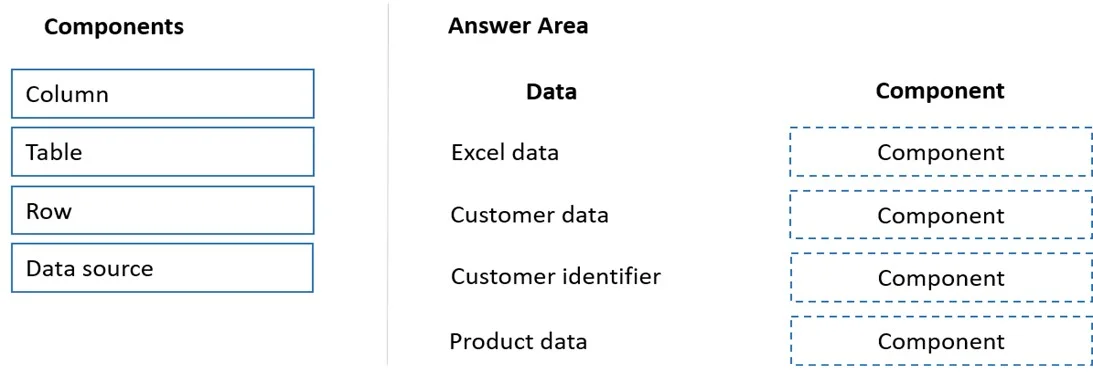
Drag and Drop Question A company stores sales orders in a Microsoft Excel workbook. The company stores customer data in a SQL Server database. You must import the data into a Microsoft Dataverse…
The correct answer is Data source; Table; Column; Row. The question tests understanding of data structure components - Data source, Table, Row, and Column - as they relate to data import into Microsoft Dataverse from external sources like Excel and SQL Server.
Question
Exhibit
Answer Area
Drag items
Correct arrangement
- Data source
- Table
- Column
- Row
Explanation
The question tests understanding of data structure components - Data source, Table, Row, and Column - as they relate to data import into Microsoft Dataverse from external sources like Excel and SQL Server.
Approach. 1. Excel data -> Data source: When importing data from an Excel workbook, the workbook itself (or the file containing the data) acts as the 'Data source' from which the information is extracted for Dataverse. 2. Customer data -> Table: 'Customer data' typically refers to a collection of records for multiple customers. In a database or Dataverse context, this collection is organized and stored within a 'Table'. 3. Customer identifier -> Column: A 'Customer identifier' (e.g., a Customer ID number) is a specific attribute or field that describes an individual customer. Such attributes are stored in a 'Column' within a table. 4. Product data -> Row: If 'Customer data' maps to a 'Table' and 'Customer identifier' to a 'Column', then 'Product data' in this context likely refers to an individual record or instance of a product, which would be represented as a 'Row' within a product table. This distinguishes it from the entire collection of product types (which would be a Table).
Common mistakes.
- common_mistake. Common mistakes include confusing the hierarchical relationship between Table, Row, and Column, or misinterpreting the scope of each data type. For instance, mapping 'Customer data' to 'Row' would be incorrect because 'Customer data' generally implies a collection of customers, not a single customer record. Similarly, mapping 'Customer identifier' to 'Table' is wrong as an identifier is a specific attribute, not an entire collection of records. Failing to recognize Excel as a 'Data source' during an import process is also a common error. Mapping 'Product data' to 'Table' could be considered incorrect if 'Customer data' already uses 'Table' and the question implies distinguishing between the collection and an instance, allowing 'Row' to be used for a single product record.
Concept tested. This question tests the fundamental understanding of data organization and terminology in relational databases and data platforms like Microsoft Dataverse. It specifically focuses on the hierarchical structure of data components: Data source, Table, Row, and Column, and how these concepts apply during data migration and mapping.
Topics
Community Discussion
No community discussion yet for this question.