
MS-900 · Question #396
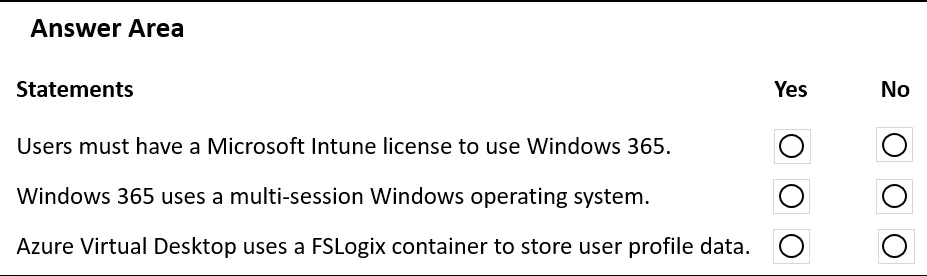
Hotspot Question A company is evaluating the capabilities of Windows 365 and Azure Virtual Desktop. For each of the following statements, select Yes if the statement is true. Otherwise, select No…
The correct answer is Users must have a Microsoft Intune license to use Windows 365. = Yes; Windows 365 uses a multi-session Windows operating system. = No; Azure Virtual Desktop uses a FSLogix container to store user profile data. = Yes. The question tests understanding of key differences and features between Windows 365 and Azure Virtual Desktop, specifically regarding licensing, session type, and user profile management.
Question
Exhibit
Answer Area
- Users must have a Microsoft Intune license to use Windows 365.Yes
- Windows 365 uses a multi-session Windows operating system.No
- Azure Virtual Desktop uses a FSLogix container to store user profile data.Yes
Explanation
The question tests understanding of key differences and features between Windows 365 and Azure Virtual Desktop, specifically regarding licensing, session type, and user profile management.
Approach. The correct approach is to evaluate each statement individually based on the technical specifications and requirements of Windows 365 and Azure Virtual Desktop:
-
Statement: Users must have a Microsoft Intune license to use Windows 365.
- Correct interaction: Select 'Yes'.
- Reasoning: Windows 365 integrates directly with Microsoft Endpoint Manager (which includes Intune) for Cloud PC provisioning, management, and security policy enforcement. While some Windows 365 editions include Intune functionality, users often need an Intune license (or a suite license that includes it, like Microsoft 365 Business Premium, F3, E3, E5) to fully manage their Cloud PCs and ensure compliance. For example, Windows 365 Enterprise requires Microsoft Endpoint Manager licenses, which typically means Intune licenses for the users.
-
Statement: Windows 365 uses a multi-session Windows operating system.
- Correct interaction: Select 'No'.
- Reasoning: Windows 365 provides dedicated, persistent Cloud PCs for each user. Each Cloud PC runs a single-session Windows 10 or Windows 11 operating system. Multi-session capability is a distinguishing feature of Azure Virtual Desktop (using Windows 10/11 Enterprise multi-session or Windows Server OS), allowing multiple users to share a single virtual machine.
-
Statement: Azure Virtual Desktop uses a FSLogix container to store user profile data.
- Correct interaction: Select 'Yes'.
- Reasoning: FSLogix Profile Containers are a foundational technology for profile management in Azure Virtual Desktop, especially in multi-session environments. They allow user profiles to be stored separately from the virtual machine's operating system disk, enabling non-persistent desktops while providing a persistent user experience. This ensures that user data and settings follow the user across different session hosts.
Common mistakes.
- common_mistake. Common mistakes stem from misunderstanding the fundamental differences between Windows 365 and Azure Virtual Desktop:
- Selecting 'No' for Intune license: This is incorrect because Windows 365 relies heavily on Intune for management, configuration, and security. Neglecting this dependency could lead to compliance issues or incomplete management capabilities.
- Selecting 'Yes' for multi-session on Windows 365: This is a common confusion point. Windows 365 offers dedicated, single-session Cloud PCs. Believing it uses multi-session indicates a misunderstanding of its core offering versus Azure Virtual Desktop's multi-session capabilities.
- Selecting 'No' for FSLogix in AVD: Denying FSLogix's role in AVD profiles overlooks a critical component of profile management in non-persistent and multi-session AVD environments. FSLogix is essential for providing a seamless and persistent user experience in AVD.
Concept tested. The core concepts tested are the key features, licensing requirements, architectural differences, and profile management strategies for Microsoft's Desktop-as-a-Service (DaaS) offerings: Windows 365 (Cloud PC) and Azure Virtual Desktop (AVD). Specifically, it assesses understanding of Intune's role in Windows 365, the single-session vs. multi-session distinction, and the importance of FSLogix for user profile management in AVD.
Topics
Community Discussion
No community discussion yet for this question.