
MS-900 · Question #364
Hotspot Question A company uses Microsoft 365. The company requires the sales team to record all live demonstrations for training purposes. You need to select the Microsoft tool that the sales team…
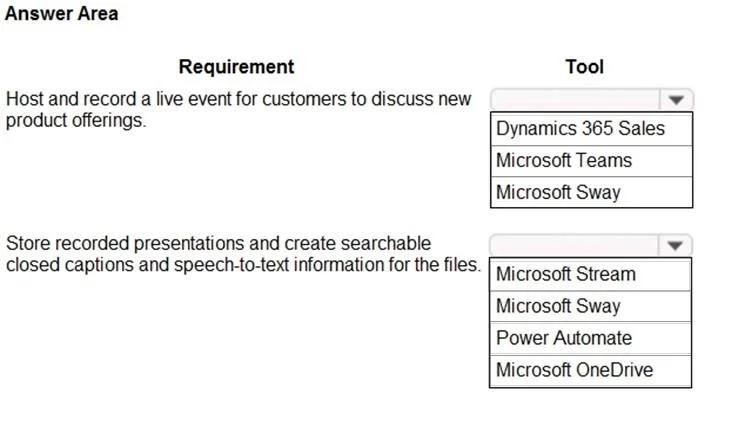
The correct interaction is to select Microsoft Teams for hosting and recording live customer events, and Microsoft Stream for storing recorded presentations with searchable closed captions and speech-to-text capabilities.
Question
Exhibit
Answer Area
- Host and record a live event for customers to discuss new product offerings.Dynamics 365 SalesMicrosoft TeamsMicrosoft Sway
- Store recorded presentations and create searchable closed captions and speech-to-text information for the files.Microsoft StreamMicrosoft SwayPower AutomateMicrosoft OneDrive
Explanation
The correct interaction is to select Microsoft Teams for hosting and recording live customer events, and Microsoft Stream for storing recorded presentations with searchable closed captions and speech-to-text capabilities.
Approach. To correctly answer this question, the test-taker must match each business requirement to the most appropriate Microsoft 365 tool based on its core functionalities:
-
Requirement: 'Host and record a live event for customers to discuss new product offerings.'
- Correct Selection: Microsoft Teams. Microsoft Teams is the primary communication and collaboration hub within Microsoft 365. It offers robust features for hosting online meetings, webinars, and live events, including the ability to record these sessions. This directly aligns with the need to 'Host and record a live event for customers'.
-
Requirement: 'Store recorded presentations and create searchable closed captions and speech-to-text information for the files.'
- Correct Selection: Microsoft Stream. Microsoft Stream is an enterprise video service designed for securely uploading, sharing, managing, and discovering videos within an organization. A key feature of Stream is its ability to automatically generate transcripts, closed captions, and enable deep search within video content using speech-to-text technology. This perfectly fulfills the requirement for storing recorded presentations and making them searchable with advanced captioning.
Common mistakes.
- common_mistake. Selecting alternative tools for these requirements would be incorrect because their primary functions do not align with the specified needs:
-
For 'Host and record a live event for customers':
- Dynamics 365 Sales: This is a Customer Relationship Management (CRM) system focused on managing customer data, sales processes, and opportunities, not for hosting or recording live online events.
- Microsoft Sway: This tool is used for creating interactive reports, presentations, and newsletters, not for live communication, event hosting, or recording.
-
For 'Store recorded presentations and create searchable closed captions and speech-to-text information':
- Microsoft Sway: As mentioned, it's a content creation tool, not a video hosting or processing service with advanced transcription capabilities.
- Power Automate: This service is used for automating workflows and business processes, not for video storage, management, or advanced transcription of video content.
- Microsoft OneDrive: While OneDrive can store video files, it is primarily a cloud storage service. It does not inherently provide the advanced, automatic, and searchable closed captions and speech-to-text features for video content that Microsoft Stream offers as a dedicated enterprise video platform. Storing a video in OneDrive does not automatically provide deep search capabilities within the video's spoken content like Stream does.
Concept tested. The underlying technical concept being tested is the knowledge of the capabilities and appropriate use cases for various Microsoft 365 applications. Specifically, it assesses the test-taker's understanding of which Microsoft 365 tool is best suited for online event hosting and recording, and which tool specializes in enterprise video management, including advanced features like automatic transcription, closed captions, and deep content search for video files.
Topics
Community Discussion
No community discussion yet for this question.