
MS-900 · Question #258
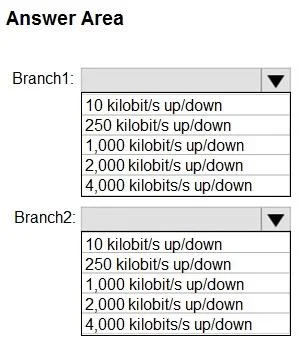
Hotspot Question Your company has two branch offices named Branch1 and Branch2. The company uses Teams. You plan to deploy Teams to the branch offices. The solution must meet the following…
To meet the minimum bandwidth requirements while minimizing costs, Branch1 (audio/video only) requires 250 kilobits/s up/down, and Branch2 (Together Mode) requires 2,000 kilobits/s up/down based on Microsoft Teams recommendations.
Question
Exhibit
Answer Area
- Branch1:10 kilobit/s up/down250 kilobit/s up/down1,000 kilobit/s up/down2,000 kilobit/s up/down4,000 kilobits/s up/down
- Branch2:10 kilobit/s up/down250 kilobit/s up/down1,000 kilobit/s up/down2,000 kilobit/s up/down4,000 kilobits/s up/down
Explanation
To meet the minimum bandwidth requirements while minimizing costs, Branch1 (audio/video only) requires 250 kilobits/s up/down, and Branch2 (Together Mode) requires 2,000 kilobits/s up/down based on Microsoft Teams recommendations.
Approach. The question asks for the minimum bandwidth required for each branch office, adhering to specific Teams usage requirements and minimizing network bandwidth costs. This requires knowledge of Microsoft Teams bandwidth recommendations for different scenarios:
-
Branch1 Requirements: 'Users in Branch1 must use only audio and video for meetings.'
- For a standard audio and video call (e.g., 360p video), Microsoft Teams generally recommends around 200-300 kbps up/down for a good experience. While 1,000 kilobits/s (1 Mbps) would provide HD quality, the requirement to 'minimize network bandwidth costs' and seek the 'minimum bandwidth' makes 250 kilobits/s up/down the most appropriate choice among the given options for basic audio and video conferencing.
-
Branch2 Requirements: 'Users in Branch2 must be able to enable Together Mode for meetings.'
- Together Mode in Microsoft Teams is a more resource-intensive feature due to its composite video rendering. Microsoft's official documentation for Teams bandwidth planning recommends approximately 2 Mbps (2,000 kilobits/s) up/down for a quality experience with Together Mode. Choosing a lower option would likely result in a poor experience or prevent the feature from working correctly. Therefore, 2,000 kilobits/s up/down is the minimum required bandwidth to enable Together Mode effectively.
Common mistakes.
- common_mistake. Common mistakes include:
- Underestimating bandwidth for Branch2 (Together Mode): Selecting 1,000 kilobits/s or less for Branch2 would be incorrect because Together Mode requires significantly more bandwidth (typically 2 Mbps) to function properly and provide a good user experience. Lower bandwidth would lead to stuttering, poor video quality, or the feature being unavailable.
- Overestimating bandwidth for Branch1: Choosing 1,000 kilobits/s or more for Branch1 when only 'audio and video' is specified goes against the requirement to 'minimize network bandwidth costs' and identify the 'minimum bandwidth'. While higher bandwidth would provide better quality, 250 kilobits/s is sufficient for basic video calls.
- Confusing different Teams features' requirements: Not knowing the specific bandwidth differences between a standard audio/video call and an advanced feature like Together Mode is a key reason for incorrect selections. Each feature has distinct recommendations.
Concept tested. Microsoft Teams network bandwidth requirements for various features, including standard audio/video calls and advanced features like Together Mode, as well as the ability to interpret requirements for 'minimum bandwidth' and 'cost minimization'.
Reference. null
Topics
Community Discussion
No community discussion yet for this question.