
MS-900 · Question #257
Hotspot Question You have a Teams deployment. You are deploying the new Teams client to user devices. When some users attempt to install the Teams client they receive an error message that states…
The correct answer is -Path: "HKLM:\SOFTWARE\Policies\Microsoft\Windows\Appx"; -Name: AllowAllTrustedApps. To resolve the Teams client installation error due to organizational policy when no GPOs are applied, remove the AllowAllTrustedApps registry property from the HKLM:\SOFTWARE\Policies\Microsoft\Windows\Appx path.
Question
Exhibit
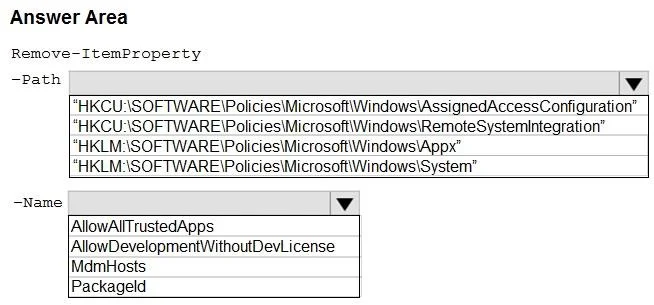
Answer Area
- -Path"HKLM:\SOFTWARE\Policies\Microsoft\Windows\Appx""HKCU:\SOFTWARE\Policies\Microsoft\Windows\AssignedAccessConfiguration""HKCU:\SOFTWARE\Policies\Microsoft\Windows\RemoteSystemIntegration""HKLM:\SOFTWARE\Policies\Microsoft\Windows\Appx""HKLM:\SOFTWARE\Policies\Microsoft\Windows\System"
- -NameAllowAllTrustedAppsAllowAllTrustedAppsAllowDevelopmentWithoutDevLicenseMdmHostsPackageId
Explanation
To resolve the Teams client installation error due to organizational policy when no GPOs are applied, remove the AllowAllTrustedApps registry property from the HKLM:\SOFTWARE\Policies\Microsoft\Windows\Appx path.
Approach. The problem states that users are receiving an error 'client cannot be installed due to organizational policy' when deploying the new Teams client, and that no Group Policy Objects (GPOs) are applied. This strongly suggests that a local policy or a policy pushed by an MDM solution (like Microsoft Intune) has set a registry key that is restricting app installations.
The new Microsoft Teams client is built as a modern Windows app (MSIX/AppX package). Policies related to the installation and sideloading of such applications are typically found under the HKLM:\SOFTWARE\Policies\Microsoft\Windows\Appx registry key.
Among the available -Name options, AllowAllTrustedApps directly relates to the ability to install applications that are not from the Microsoft Store or are considered 'trusted' outside the store. If this registry value is present and set to disable the installation of trusted apps (e.g., set to 0), it would prevent the new Teams client from installing. Removing this property using Remove-ItemProperty effectively removes the restriction, allowing the installation to proceed. The path is HKLM because app installation policies are generally machine-wide and apply to all users, rather than user-specific HKCU settings.
Common mistakes.
- common_mistake. 1. Choosing
HKCUpaths: Policies underHKEY_CURRENT_USER(HKCU) are user-specific. App installation restrictions are typically machine-wide and would be found underHKEY_LOCAL_MACHINE(HKLM) to affect all users on the device.
- Choosing
HKLM:\SOFTWARE\Policies\Microsoft\Windows\AssignedAccessConfiguration: This path is related to 'Kiosk Mode' or 'Assigned Access' features, which lock a device to a single application, not general app installation policies. - Choosing
HKLM:\SOFTWARE\Policies\Microsoft\Windows\RemoteSystemIntegrationorHKLM:\SOFTWARE\Policies\Microsoft\Windows\System: These paths relate to different system functionalities and general Windows policies, not specifically to modern application installation restrictions (AppX/MSIX). - Choosing
AllowDevelopmentWithoutDevLicense: While this is anAppxrelated policy, it specifically pertains to developers sideloading unsigned or development-specific apps without a developer license. It's less likely to be the cause of a general 'organizational policy' preventing the deployment of a legitimate client like Teams. - Choosing
MdmHostsorPackageId: These are not policy names that directly control the ability to install apps.MdmHostsis related to MDM configuration, andPackageIdis an identifier for an application package, not a policy setting.
Concept tested. Understanding of Windows application deployment mechanisms, specifically for modern apps (AppX/MSIX packages), the role of Windows Registry in storing local and MDM-pushed policies, and the use of PowerShell Remove-ItemProperty cmdlet to manage registry settings to resolve application installation issues.
Reference. null
Topics
Community Discussion
No community discussion yet for this question.