
MS-900 · Question #78
Hotspot Question A company deploys Microsoft Intune. An employee loses a Windows 10 device that contains corporate data. You need to ensure that the corporate data on the device is secured as…
The correct answer is Retire = Yes; Wipe = Yes; Delete = No; Remote lock = Yes; Sync = No; Restart = No; Fresh Start = Yes. To quickly secure corporate data on a lost Windows 10 device via Intune, select Wipe, Retire, Remote lock, and Fresh start, as these actions either remove data or prevent unauthorized access.
Question
Exhibit
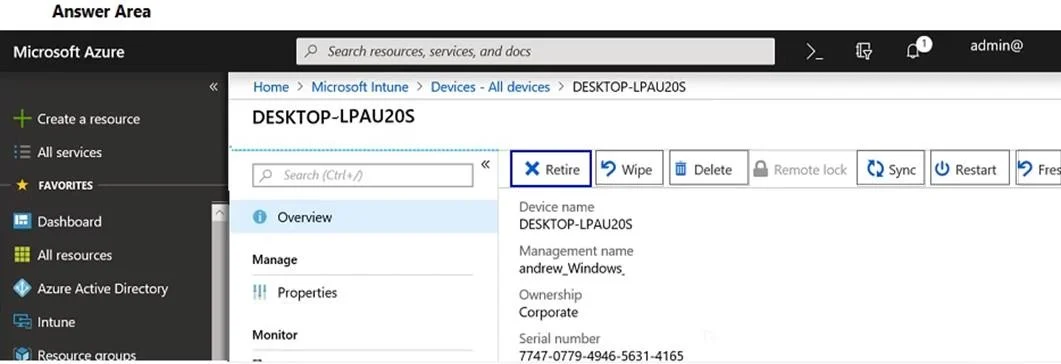
Answer Area
- RetireYes
- WipeYes
- DeleteNo
- Remote lockYes
- SyncNo
- RestartNo
- Fresh StartYes
Explanation
To quickly secure corporate data on a lost Windows 10 device via Intune, select Wipe, Retire, Remote lock, and Fresh start, as these actions either remove data or prevent unauthorized access.
Approach. The goal is to secure corporate data on a lost Windows 10 device as quickly as possible. The four appropriate actions to select as hotspots are:
- Wipe: This action performs a factory reset on the device, removing all data (corporate and personal), apps, and settings. It is the most comprehensive way to ensure no corporate data remains on the device, especially for a lost or stolen device.
- Retire: This action removes only corporate applications, data, and profiles from the device. It is suitable for securing corporate data while leaving personal data intact, or for corporate-owned devices that need to be cleaned of company data but remain functional (e.g., prior to repurposing). For a lost device, it ensures corporate data is removed quickly.
- Remote lock: This action locks the device screen immediately, requiring a PIN to unlock it. While it doesn't delete data, it prevents unauthorized access to the device and its data in the short term, buying time for other actions like Wipe or Retire to complete or for the device to be recovered.
- Fresh start: This action reinstalls Windows, removing all user data, applications (including corporate apps not part of the base OS), and non-standard drivers, effectively providing a clean operating system. This secures corporate data by removing it along with other user-installed software and files. It's a powerful way to clean the device and prevent data exposure.
Common mistakes.
- common_mistake. Common mistakes include selecting 'Delete', 'Sync', or 'Restart'.
- Delete: This action only removes the device's record from Intune. It does NOT remove any data from the physical device itself, therefore it does not secure corporate data.
- Sync: This action forces the device to check in with Intune immediately. It does not secure data; it merely ensures the device receives pending commands or policy updates.
- Restart: This action simply reboots the device. It has no impact on securing data. Choosing these options would fail to meet the objective of securing corporate data on a lost device. While 'Wipe', 'Retire', 'Remote lock', and 'Fresh start' all contribute to data security in different ways, the other options do not.
Concept tested. Microsoft Intune device management actions, specifically remote actions for data security and device control on lost or compromised Windows 10 devices, including understanding the distinctions between 'Wipe', 'Retire', 'Remote lock', and 'Fresh start'.
Topics
Community Discussion
No community discussion yet for this question.