
MS-900 · Question #263
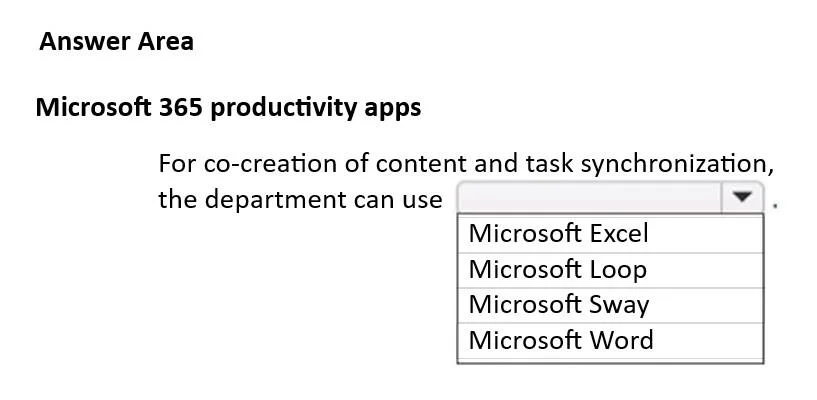
Hotspot Question A company uses Microsoft 365 Apps. The marketing department plans to implement a new company project. The marketing department requires an application that provides portable…
The correct answer is For co-creation of content and task synchronization, the department can use: Microsoft Loop. The correct application to recommend for co-creation of portable content components and task synchronization across Teams and Outlook is Microsoft Loop, as it is specifically designed for these modern collaborative features.
Question
Exhibit
Answer Area
- For co-creation of content and task synchronization, the department can useMicrosoft LoopMicrosoft ExcelMicrosoft LoopMicrosoft SwayMicrosoft Word
Explanation
The correct application to recommend for co-creation of portable content components and task synchronization across Teams and Outlook is Microsoft Loop, as it is specifically designed for these modern collaborative features.
Approach. The correct interaction is to click on the dropdown menu and select 'Microsoft Loop'. The scenario requires an application that provides 'portable components for the co-creation of content' and can 'synchronize project tasks across Teams and Outlook'.
Microsoft Loop is purpose-built for this exact functionality. Loop components are live, portable pieces of content (like tables, task lists, paragraphs) that can be shared and co-edited across various Microsoft 365 applications, including Teams, Outlook, and Whiteboard. When a Loop component is updated in one application, it automatically synchronizes and updates in all other locations where it's embedded. This directly addresses the requirement for 'portable components' and 'synchronization of project tasks across Teams and Outlook' (e.g., using a Loop task list component).
Common mistakes.
- common_mistake. A common mistake would be to choose a traditional Microsoft 365 app like Excel, Word, or Sway.
- Microsoft Excel and Microsoft Word support co-authoring of documents and spreadsheets, respectively, but they do not provide 'portable components' that can be embedded and stay live-synced across different applications like Loop components do. While they can be used for tasks, their primary purpose is not cross-application task synchronization in the way Loop facilitates.
- Microsoft Sway is designed for creating interactive reports, presentations, and newsletters. It is not geared towards real-time co-creation of embedded, portable content components or task management across Teams and Outlook.
Test-takers might select familiar applications that offer some level of collaboration without understanding the specific, unique capabilities of Microsoft Loop components, which directly address all aspects of the question's requirements (portable components, co-creation, cross-app task synchronization).
Concept tested. Understanding the capabilities and appropriate use cases of various Microsoft 365 productivity applications, specifically distinguishing the unique features of Microsoft Loop components for real-time collaboration, portable content, and cross-application synchronization within the Microsoft 365 ecosystem.
Topics
Community Discussion
No community discussion yet for this question.