
MS-900 · Question #262
Hotspot Question A company is preparing a blueprint to launch a new product line. The blueprint will include a large number of task lists, notes, and tables that must be shared across multiple…
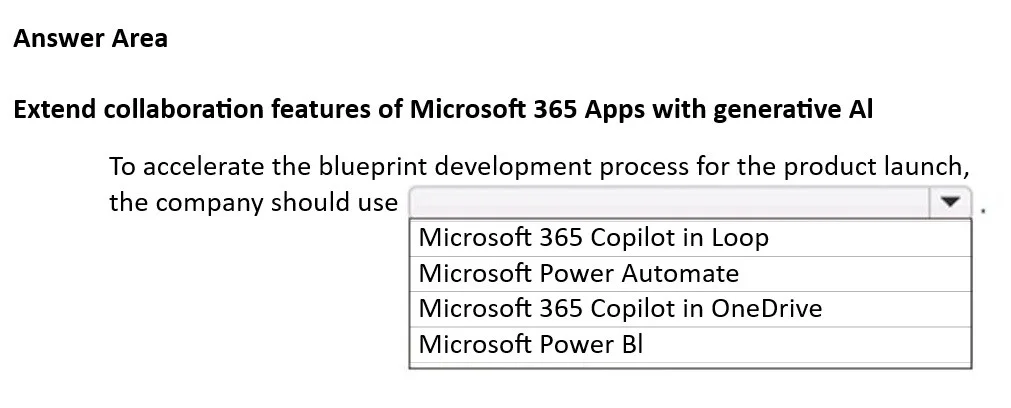
The correct answer is To accelerate the blueprint development process for the product launch, the company should use: Microsoft 365 Copilot in Loop. The correct answer is 'Microsoft 365 Copilot in Loop' because it combines generative AI with dynamic, collaborative components that can be shared and synced across multiple Microsoft 365 applications, perfectly suiting the scenario's requirements.
Question
Exhibit
Answer Area
- To accelerate the blueprint development process for the product launch, the company should useMicrosoft 365 Copilot in LoopMicrosoft 365 Copilot in LoopMicrosoft Power AutomateMicrosoft 365 Copilot in OneDriveMicrosoft Power BI
Explanation
The correct answer is 'Microsoft 365 Copilot in Loop' because it combines generative AI with dynamic, collaborative components that can be shared and synced across multiple Microsoft 365 applications, perfectly suiting the scenario's requirements.
Approach. The question asks to recommend a capability that combines 'generative AI' with the ability to manage 'task lists, notes, and tables that must be shared across multiple Microsoft 365 apps' to accelerate blueprint development.
- Generative AI: The requirement for 'generative AI capabilities' immediately narrows down the options to those involving 'Microsoft 365 Copilot', eliminating 'Microsoft Power Automate' and 'Microsoft Power BI'.
- Shared across multiple Microsoft 365 apps (dynamic components): The phrase 'large number of task lists, notes, and tables that must be shared across multiple Microsoft 365 apps' is critical. Microsoft Loop is specifically designed for creating portable, collaborative 'Loop components' (like task lists, tables, notes) that can be embedded and kept in real-time sync across various Microsoft 365 apps (e.g., Teams, Outlook, Word, Whiteboard). This directly addresses the need for dynamic sharing of these content types.
- Acceleration: Microsoft 365 Copilot, when integrated with Loop, can help generate and refine these components, thereby accelerating the blueprint development process.
Therefore, selecting 'Microsoft 365 Copilot in Loop' correctly satisfies all the stated requirements. The interaction is to click on the dropdown menu and then select 'Microsoft 365 Copilot in Loop'.
Common mistakes.
- common_mistake. 1. Microsoft 365 Copilot in OneDrive: While Copilot in OneDrive offers generative AI features (e.g., summarizing files, generating insights from documents), its primary focus is on files stored in OneDrive. It does not provide the 'Loop component' functionality of creating dynamic, shareable, and embeddable pieces of content (task lists, notes, tables) that stay in real-time sync across multiple M365 apps in the same collaborative fashion as Loop. The scenario emphasizes 'shared across multiple Microsoft 365 apps' for discrete content elements, which is the core value proposition of Loop components. Choosing this option would miss the collaborative, component-based aspect.
- Microsoft Power Automate: Power Automate is a service for creating automated workflows and business processes. It does not offer generative AI for content creation (task lists, notes) or direct collaborative component sharing across M365 apps.
- Microsoft Power BI: Power BI is a business intelligence tool used for data visualization and reporting. It has no relevance to generative AI for content creation or collaborative document components.
Concept tested. Understanding of Microsoft 365 Copilot's capabilities and its integration with different Microsoft 365 applications, specifically the unique value proposition of Microsoft Loop for collaborative, dynamic content components shared across apps.
Topics
Community Discussion
No community discussion yet for this question.