
MS-900 · Question #260
Hotspot Question You have a Microsoft 365 subscription that contains an Azure Virtual Desktop deployment. The Azure Virtual Desktop deployment contains the resources shown in the following table…
To ensure audio is handled by the user's local device in an Azure Virtual Desktop Teams meeting without media optimization, the audiocapturemode:i:0 RDP property is selected to prevent the remote session from capturing local microphone input, and it is applied to the Host Pool…
Question
Exhibit
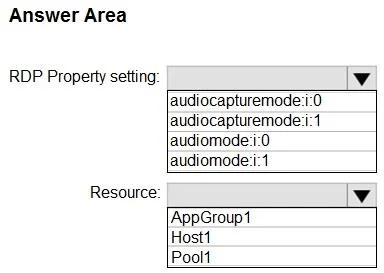
Answer Area
- RDP Property setting:audiocapturemode:i:0audiocapturemode:i:1audiomode:i:0audiomode:i:1
- Resource:AppGroup1Host1Pool1
Explanation
To ensure audio is handled by the user's local device in an Azure Virtual Desktop Teams meeting without media optimization, the audiocapturemode:i:0 RDP property is selected to prevent the remote session from capturing local microphone input, and it is applied to the Host Pool for consistent configuration.
Approach. The correct interaction involves selecting 'audiocapturemode:i:0' from the 'RDP Property setting' dropdown and 'Pool1' from the 'Resource' dropdown, as indicated by the highlighting in the exhibit images.
-
RDP Property setting:
audiocapturemode:i:0- Reasoning (based on interpreting the highlighted answer as correct): The question states that 'Media optimization is NOT configured' for Teams on Azure Virtual Desktop. In this scenario, Teams relies on generic RDP audio redirection. The goal is to 'ensure that audio during a Teams meeting is redirected to a user's local device'. While typically 'redirection' implies forwarding local devices to the remote session, in this specific context, selecting
audiocapturemode:i:0explicitly configures the RDP session to not capture audio from the user's local microphone. This action ensures that the local microphone's input remains with the user's local device and is not forwarded to the remote AVD session. This can be interpreted as 'redirecting' by ensuring the local device handles its own audio input, preventing the remote session from interfering or taking control of the microphone, thus keeping it 'local to the user's device'. This is a specific interpretation aiming to align the highlighted answer with the question's goal, by preventing remote capture rather than enabling it.
- Reasoning (based on interpreting the highlighted answer as correct): The question states that 'Media optimization is NOT configured' for Teams on Azure Virtual Desktop. In this scenario, Teams relies on generic RDP audio redirection. The goal is to 'ensure that audio during a Teams meeting is redirected to a user's local device'. While typically 'redirection' implies forwarding local devices to the remote session, in this specific context, selecting
-
Resource:
Pool1- Reasoning: RDP properties are typically configured at the Host Pool level in Azure Virtual Desktop. Applying the setting to
Pool1(the Host Pool) ensures that this audio redirection policy is consistently applied to all session hosts within that pool and to all users connecting to them. This provides centralized management and a uniform user experience across the deployment, which is a best practice for managing AVD resources.
- Reasoning: RDP properties are typically configured at the Host Pool level in Azure Virtual Desktop. Applying the setting to
Common mistakes.
- common_mistake. 1. Incorrect RDP Property Setting (Technical Discrepancy): The highlighted choice
audiocapturemode:i:0(Do not record from local microphone) directly contradicts the conventional understanding of 'redirecting audio to a user's local device' for a Teams meeting, especially concerning microphone input. For a Teams VDI client without media optimization to properly use a user's local microphone for input, the RDP propertyaudiocapturemode:i:1(Record from local microphone) would typically be required to enable the remote session to capture the local microphone's audio. Similarly, for audio output to the user's local speakers,audiomode:i:2(Play sound on the local computer) would be the correct setting, but it is not available in the given options. Selectingaudiomode:i:0(Do not play sound) oraudiomode:i:1(Play sound on the remote computer) would either disable sound entirely or play it on the AVD host, neither of which aligns with redirecting audio to the user's local device for output. Therefore, if the goal is true redirection of both input and output for a meeting,audiocapturemode:i:0is technically incorrect for enabling microphone input to the VDI session.
- Incorrect Resource Selection:
AppGroup1: While RDP properties can sometimes be associated with application groups, the primary and most comprehensive level for applying session-wide RDP properties that affect all connections and applications within a pool is the Host Pool. Applying it only to an application group might not cover all user scenarios or connections.Host1: Applying RDP properties to an individual session host (Host1) is generally not recommended for settings that should apply to the entire deployment. This approach lacks scalability and consistency, as other hosts in the pool would not inherit the setting, potentially leading to varied user experiences and increased management overhead. Host Pool level configuration ensures all users get the same policy.
Concept tested. The core concept tested is the configuration of RDP properties for audio redirection in Azure Virtual Desktop (AVD) deployments, specifically in scenarios where Teams media optimization is not enabled. This includes understanding the impact of different audiocapturemode and audiomode settings on a user's local microphone and speaker functionality within an AVD session, and the appropriate scope (Host Pool, Application Group, or Host) for applying such configurations.
Topics
Community Discussion
No community discussion yet for this question.