
MS-900 · Question #156
Hotspot Question A company has Microsoft Surface devices that run Windows 10. The company plans to deploy devices by using Windows AutoPilot. You need to import a CSV file to ensure that the devices…
The correct answer is All services = No; Dashboard = No; Device enrollment = Yes; Device compliance = No; Device configuration = Yes; Devices = No; Software updates = No; Client apps = No; Conditional Access = No; Users = No; Groups = No; Roles = No. To import a CSV file for Windows AutoPilot device deployment, you must navigate to the 'Device enrollment' blade for the import function and the broader 'Devices' blade for general device management within the Microsoft 365 Device Management portal.
Question
Exhibit
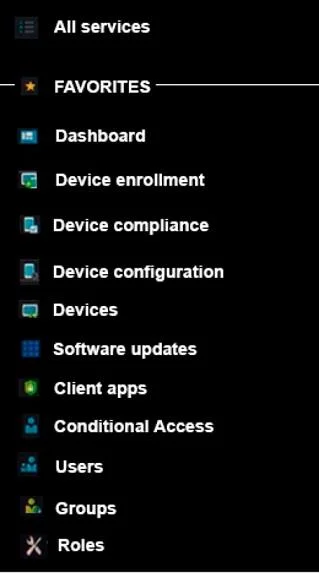
Answer Area
- All servicesNo
- DashboardNo
- Device enrollmentYes
- Device complianceNo
- Device configurationYes
- DevicesNo
- Software updatesNo
- Client appsNo
- Conditional AccessNo
- UsersNo
- GroupsNo
- RolesNo
Explanation
To import a CSV file for Windows AutoPilot device deployment, you must navigate to the 'Device enrollment' blade for the import function and the broader 'Devices' blade for general device management within the Microsoft 365 Device Management portal.
Approach. The correct interaction is to select both the 'Device enrollment' and 'Devices' blades from the menu.
-
Device enrollment: This blade is essential because it contains the 'Windows enrollment' section, which is where you manage Windows AutoPilot devices. Within 'Windows enrollment', there's a specific 'Devices' sub-section where you can import CSV files containing device hardware IDs for AutoPilot registration. Therefore, 'Device enrollment' is directly where the CSV import functionality resides.
-
Devices: This blade serves as the central hub for managing all devices (Windows, iOS, Android, macOS) enrolled in Intune. Although the specific AutoPilot CSV import is under 'Device enrollment', the overall management and viewing of these imported AutoPilot devices, as well as accessing platform-specific settings that lead to enrollment options, often begin from the top-level 'Devices' blade. In many portal navigation flows, you would first click 'Devices' and then navigate to 'Windows' and subsequently 'Windows enrollment' to get to the AutoPilot device management. The question asks for two blades 'to use' for the deployment process, implying both the specific enrollment function and the general device management context.
Common mistakes.
- common_mistake. Common mistakes include selecting blades that are related to other aspects of device management but not directly to AutoPilot device enrollment via CSV import.
- Device compliance: Used for defining and monitoring compliance policies for devices, not for initial device registration.
- Device configuration: Used for deploying configuration profiles (settings, features, restrictions) to devices, not for importing new devices.
- Software updates: Manages updates for devices.
- Client apps: Manages the deployment of applications to devices.
- Conditional Access: Controls access to resources based on device or user conditions.
- Users, Groups, Roles: These are for managing identities, authorization, and permissions, not for device hardware registration.
- Dashboard: Provides an overview, not a functional area for device import.
While 'Devices' is broad, it's a fundamental blade for any device-related task, and 'Device enrollment' is specifically where AutoPilot device registration occurs. Therefore, other options are incorrect as they do not facilitate the task of importing a CSV for AutoPilot deployment.
Concept tested. The core concept being tested is the administrator's knowledge of Windows AutoPilot device registration (specifically via CSV import) and the correct navigation within the Microsoft Intune / Microsoft 365 Device Management portal to perform this task.
Topics
Community Discussion
No community discussion yet for this question.