
MS-900 · Question #157
Hotspot Question A company uses Microsoft 365 Business to address its compliance needs. A customer requests a complete disclosure of all personal data that relates to them. You need to create a new…
The correct answer is First action area: Data privacy; Second action area: Compliance officer. To address a Data Subject Request (DSR) and ensure compliance managers can view its findings, one must create an eDiscovery case and manage permissions for access.
Question
Exhibit
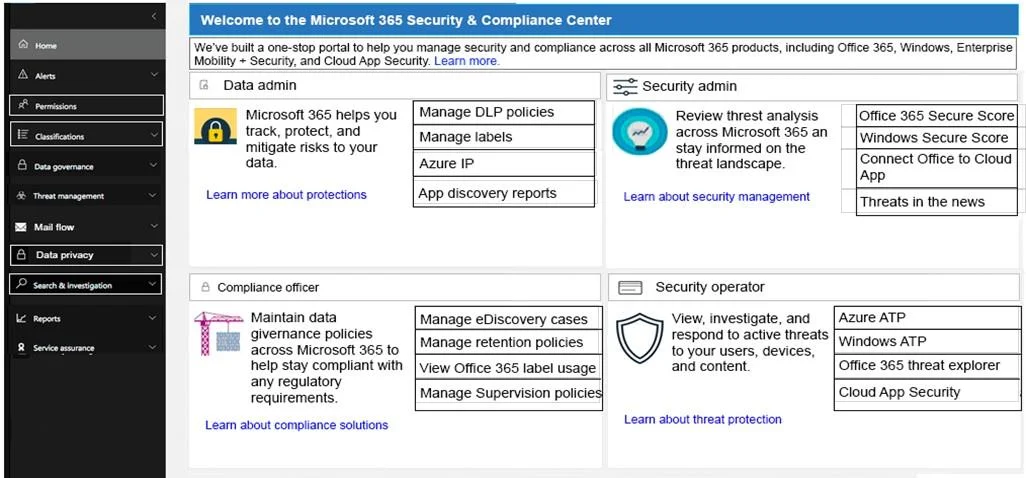
Answer Area
- First action areaData privacyHomeAlertsPermissionsClassificationsData governanceThreat managementMail flowData privacySearch & investigationReportsService assuranceData adminManage DLP policiesManage labelsAzure IPApp discovery reportsSecurity adminOffice 365 Secure ScoreWindows Secure ScoreConnect Office to Cloud AppThreats in the newsCompliance officerManage eDiscovery casesManage retention policiesView Office 365 label usageManage Supervision policiesSecurity operatorAzure ATPWindows ATPOffice 365 threat explorerCloud App Security
- Second action areaCompliance officerHomeAlertsPermissionsClassificationsData governanceThreat managementMail flowData privacySearch & investigationReportsService assuranceData adminManage DLP policiesManage labelsAzure IPApp discovery reportsSecurity adminOffice 365 Secure ScoreWindows Secure ScoreConnect Office to Cloud AppThreats in the newsCompliance officerManage eDiscovery casesManage retention policiesView Office 365 label usageManage Supervision policiesSecurity operatorAzure ATPWindows ATPOffice 365 threat explorerCloud App Security
Explanation
To address a Data Subject Request (DSR) and ensure compliance managers can view its findings, one must create an eDiscovery case and manage permissions for access.
Approach. The question asks for two actions: creating a new DSR case and ensuring compliance managers can view DSR case findings.
-
To create a new DSR case: Data Subject Requests (DSRs) often involve identifying, collecting, and reviewing personal data, which aligns directly with the capabilities of eDiscovery. Therefore, 'Manage eDiscovery cases' under the 'Compliance officer' section is the correct hotspot for creating and managing a DSR case. eDiscovery tools are designed for legal and compliance investigations, making them suitable for handling DSRs.
-
To ensure compliance managers can view all DSR case findings: This requirement is about access control and roles. To grant or verify that specific users (compliance managers) have the necessary permissions to view case findings, you must navigate to the 'Permissions' section in the left navigation pane. This is where administrative roles and role groups are managed in the Security & Compliance Center, allowing an administrator to assign the appropriate permissions to compliance managers for eDiscovery cases.
Common mistakes.
- common_mistake. 1. Selecting 'Data privacy' from the left navigation: While DSRs are a data privacy concern, the 'Data privacy' section typically contains settings for DSRs, not the actual workflow for creating a specific case that leverages discovery tools to fulfill a request or managing permissions for such a case. Creating the case itself typically falls under eDiscovery.
- Selecting 'Search & investigation' from the left navigation: This section is used for performing searches within existing cases or for general content searches, not for creating the case itself or managing permissions for it.
- Selecting 'App discovery reports': This link, although highlighted in the second image, is irrelevant to managing a DSR case. It's used for discovering and managing applications, not personal data subject to a DSR.
- Selecting other links under 'Data admin', 'Security admin', or 'Security operator': None of these links directly address either creating an eDiscovery-like case for a DSR or managing permissions for compliance managers to access case findings.
Concept tested. This question tests the candidate's knowledge of the Microsoft 365 Security & Compliance Center, specifically understanding how to handle Data Subject Requests (DSRs) using eDiscovery tools and how to manage role-based access control (RBAC) for compliance-related tasks and data.
Topics
Community Discussion
No community discussion yet for this question.