
MS-721 · Question #213
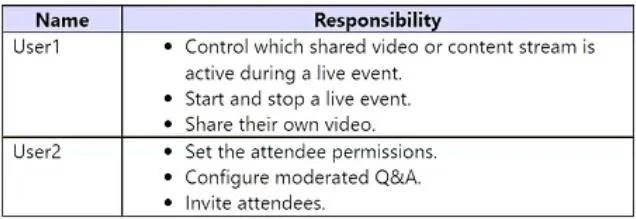
Drag and Drop Question Your company has a Microsoft Teams deployment. You have two users that have event group responsibilities as shown in the following table. The company plans to run a live event…
The correct answer is Producer; Organizer. This question tests knowledge of Microsoft Teams live event roles by matching specific user responsibilities to the correct 'Organizer', 'Producer', or 'Presenter' role.
Question
Exhibit
Answer Area
Drag items
Correct arrangement
- Producer
- Organizer
Explanation
This question tests knowledge of Microsoft Teams live event roles by matching specific user responsibilities to the correct 'Organizer', 'Producer', or 'Presenter' role.
Approach. To correctly answer this question, one must understand the distinct responsibilities of each role in a Microsoft Teams live event. User1's tasks- 'control which shared video or content stream is active', 'start and stop a live event', and 'share their own video' - are core functions of a Producer. The Producer is the one who manages the live stream, switches between presenters, content, and generally directs what the audience sees. User2's tasks- 'set the attendee permissions', 'configure moderated Q&A', and 'invite attendees' - are primary responsibilities of the Organizer. The Organizer is responsible for scheduling the event, managing attendee settings, and handling pre-event logistics. Therefore, 'Producer' should be dragged to User1, and 'Organizer' should be dragged to User2.
Common mistakes.
- common_mistake. A common mistake would be to confuse the 'Presenter' role with the 'Producer' role. While a Presenter can share their video and content, they do not have the control to start/stop the event or actively switch between different video/content streams that the audience sees; that is the Producer's job. Assigning 'Presenter' to User1 would be incorrect because User1 has higher-level control responsibilities. Another mistake would be to assign 'Presenter' to User2. The Presenter's role is focused on delivering content during the event, not on pre-event setup like inviting attendees or configuring Q&A settings, which are Organizer responsibilities.
Concept tested. Understanding of roles and permissions within Microsoft Teams live events, specifically differentiating between the Organizer, Producer, and Presenter roles based on their operational responsibilities.
Topics
Community Discussion
No community discussion yet for this question.