
MS-721 · Question #211
Drag and Drop Question Your company has a Microsoft Teams deployment and the following departments: - Sales - Marketing You need to recommend a licensing strategy that meets the following…
The correct answer is Microsoft Teams Premium; Microsoft Teams Premium. The correct licensing strategy involves assigning Microsoft Teams Premium to both the Sales and Marketing departments to meet their specific advanced feature requirements while minimizing costs by choosing the lowest-tier license that fulfills all needs.
Question
Exhibit
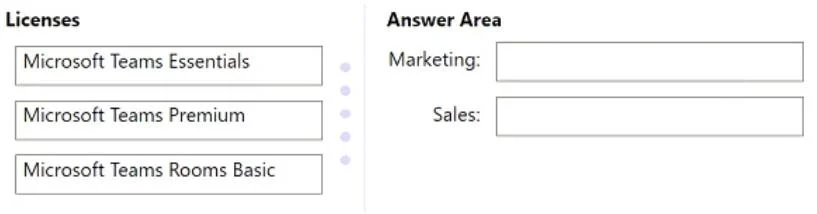
Answer Area
Drag items
Correct arrangement
- Microsoft Teams Premium
- Microsoft Teams Premium
Explanation
The correct licensing strategy involves assigning Microsoft Teams Premium to both the Sales and Marketing departments to meet their specific advanced feature requirements while minimizing costs by choosing the lowest-tier license that fulfills all needs.
Approach. The question specifies two key requirements: the Sales department needs to prevent meeting attendees from copying and pasting in meeting chats, and the Marketing department needs to customize meeting templates. Both of these features-preventing copy/paste in meeting chats (an advanced meeting protection feature) and customizing meeting templates (an advanced meeting management feature)-are exclusive to Microsoft Teams Premium. Microsoft Teams Essentials does not offer these advanced capabilities. Microsoft Teams Rooms Basic is designed for physical meeting room devices, not individual users, and is therefore irrelevant. Since both departments require features only available in Teams Premium, and the solution must minimize costs, assigning Microsoft Teams Premium to both departments is the most cost-effective way to meet all stated requirements. Therefore, drag 'Microsoft Teams Premium' to the 'Marketing' box and 'Microsoft Teams Premium' to the 'Sales' box.
Common mistakes.
- common_mistake. A common mistake would be to select Microsoft Teams Essentials to minimize costs. While Essentials is the cheapest option, it does not provide the advanced features required by either the Sales (prevent copy/paste) or Marketing (custom meeting templates) departments, thus failing to meet the core requirements of the scenario. Another mistake would be to consider Microsoft Teams Rooms Basic, which is completely unrelated to user-specific meeting features and intended for conference room devices. Incorrectly assuming that the required features might be available in a lower-tier license or trying to mix licenses with Essentials when it doesn't meet the functional needs would also be wrong, as it either wouldn't meet the requirements or wouldn't be possible to fulfill them with a cheaper license.
Concept tested. Understanding the feature differences and licensing tiers within Microsoft Teams (specifically Microsoft Teams Essentials vs. Microsoft Teams Premium), and the ability to choose the appropriate license based on specific business requirements while considering cost optimization.
Topics
Community Discussion
No community discussion yet for this question.