
MS-721 · Question #282
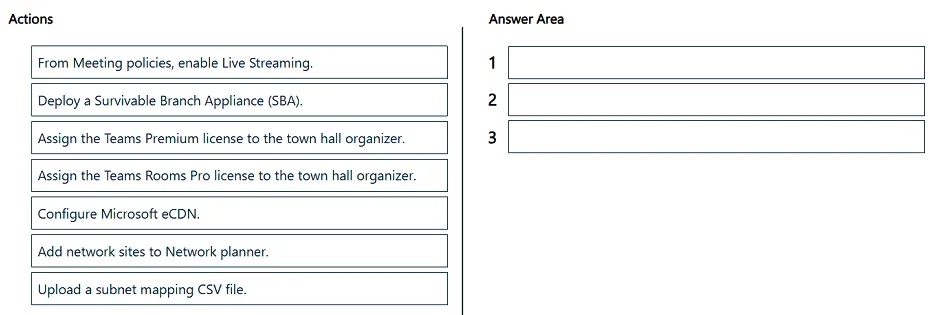
Drag and Drop Question You have a Microsoft Teams deployment that contains remote sites with limited bandwidth. You need to run a town hall that meets the following requirements: - Attendees must…
The correct answer is Assign the Teams Premium license to the town hall organizer.; Add network sites to Network planner.; Configure Microsoft eCDN. To optimize town hall streaming for remote sites with limited bandwidth without additional hardware or software, assign the Teams Premium license to the organizer, define network sites in Network planner, and then configure Microsoft eCDN.
Question
Exhibit
Answer Area
Drag items
Correct arrangement
- Assign the Teams Premium license to the town hall organizer.
- Add network sites to Network planner.
- Configure Microsoft eCDN.
Explanation
To optimize town hall streaming for remote sites with limited bandwidth without additional hardware or software, assign the Teams Premium license to the organizer, define network sites in Network planner, and then configure Microsoft eCDN.
Approach. The scenario requires running a town hall for remote sites with limited bandwidth, minimizing internet streaming, preventing sharing between sites, and avoiding additional client software/hardware. This set of requirements points directly to using an Enterprise Content Delivery Network (eCDN) solution within Microsoft Teams. Microsoft eCDN is a feature that optimizes live event streaming by distributing content efficiently across the corporate network, reducing internet egress and WAN traffic. The steps to enable and leverage this effectively are:
- Assign the Teams Premium license to the town hall organizer. Microsoft Teams Premium is required for advanced meeting capabilities, including Town Halls with eCDN integration. Without the correct license, the organizer cannot access or create these types of events with the required features.
- Add network sites to Network planner. For Microsoft eCDN to work optimally, it needs to understand the network topology, including defined sites and subnets. The Network planner (found in the Teams admin center under Locations - Network topology) is where administrators define these network sites and associate them with subnets. This information allows eCDN to intelligently distribute content and optimize local caching or peer-to-peer streaming within a site.
- Configure Microsoft eCDN. Once the prerequisites (licensing and network topology) are in place, Microsoft eCDN needs to be configured or enabled in the Teams admin center. This step activates the eCDN service to manage and optimize the delivery of the town hall stream according to the defined network sites and overall strategy.
Common mistakes.
- common_mistake. Several options are incorrect or less appropriate:
- 'From Meeting policies, enable Live Streaming.': While live streaming must be enabled, the core problem is optimizing bandwidth for a town hall, which eCDN directly addresses. This option is a general prerequisite, not specific to the bandwidth optimization requirement.
- 'Deploy a Survivable Branch Appliance (SBA).': SBAs are designed for voice resilience during WAN outages, not for optimizing large-scale video streaming bandwidth.
- 'Assign the Teams Rooms Pro license to the town hall organizer.': Teams Rooms Pro is for meeting room devices, not for individual users organizing town halls.
- 'Upload a subnet mapping CSV file.': This is a method for adding network sites, but 'Add network sites to Network planner' is the overarching action that encompasses this task. In a drag-and-drop, the higher-level action is usually preferred when both are present and one is a sub-task of the other. The question asks for 'actions' to perform, and 'Add network sites to Network planner' is the direct action.
Concept tested. Microsoft Teams Town Hall capabilities, Enterprise Content Delivery Network (eCDN) for live event optimization, Teams Premium licensing, and network topology planning within the Teams admin center.
Reference. null
Topics
Community Discussion
No community discussion yet for this question.