
MS-721 · Question #280
Drag and Drop Question You have a Microsoft Teams deployment that contains a user named User1. You need to ensure that User1 can schedule webinars. The solution must meet the following requirements…
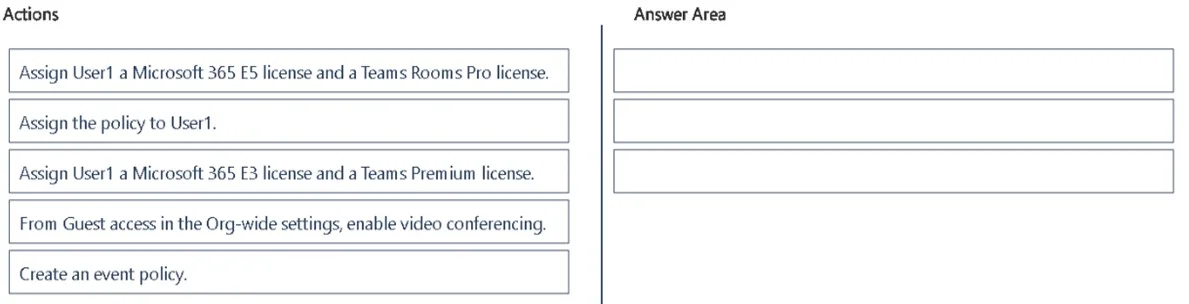
The correct answer is Assign User1 a Microsoft 365 E3 license and a Teams Premium license.; Create an event policy.; Assign the policy to User1. The correct approach involves assigning the necessary Teams Premium license, creating a custom event policy enabling public webinars, anonymous join, and RTMP encoding, and then assigning this policy to the specific user.
Question
Exhibit
Answer Area
Drag items
Correct arrangement
- Assign User1 a Microsoft 365 E3 license and a Teams Premium license.
- Create an event policy.
- Assign the policy to User1.
Explanation
The correct approach involves assigning the necessary Teams Premium license, creating a custom event policy enabling public webinars, anonymous join, and RTMP encoding, and then assigning this policy to the specific user.
Approach. The correct interaction involves dragging three specific actions from the 'Actions' list into the 'Answer Area' and arranging them in the following logical sequence:
- 'Assign User1 a Microsoft 365 E3 license and a Teams Premium license.': This is the foundational step. The requirements to schedule public webinars and support in-house RTMP encoders are advanced features provided by Microsoft Teams Premium. Microsoft documentation confirms that an E3 or E5 license combined with a Teams Premium add-on (or an E5 license which includes Premium features) is necessary for custom RTMP streaming and advanced webinar functionalities. This action ensures User1 has the prerequisite licensing.
- 'Create an event policy.': Following licensing, a custom event policy must be created. This policy will be configured to allow public webinars, enable anonymous users to join (a requirement), and specifically support RTMP encoders. Creating a policy allows for granular control over these advanced features.
- 'Assign the policy to User1.': The final step is to assign the newly created and configured event policy to User1. This ensures that the specific webinar capabilities (public webinars, anonymous join, RTMP support) are applied to User1's account, thereby meeting the requirement that 'only User1 can schedule public webinars' (by selectively assigning the policy).
Common mistakes.
- common_mistake. Two common mistakes or incorrect choices from the 'Actions' list are:
- 'Assign User1 a Microsoft 365 E5 license and a Teams Rooms Pro license.': While a Microsoft 365 E5 license does include Teams Premium features, fulfilling the licensing requirement for advanced webinars, the inclusion of 'Teams Rooms Pro license' is irrelevant for an individual user scheduling webinars. Teams Rooms Pro is designed for managing Microsoft Teams Rooms devices, not for user-specific webinar capabilities. This makes the E3 + Teams Premium option a more precise fit for the specific features required.
- 'From Guest access in the Org-wide settings, enable video conferencing.': This action is incorrect because 'Guest access' settings primarily govern the permissions and capabilities of external users who are added as 'guests' to a Microsoft Team. The requirement for 'anonymous users' to join webinars is a distinct concept from guest access. Anonymous join for meetings and webinars is typically configured within specific meeting/event policies or separate org-wide meeting settings, not under guest access. Furthermore, enabling video conferencing for guests does not contribute to enabling webinar scheduling or RTMP encoder support.
Concept tested. The core concepts tested include Microsoft Teams webinar capabilities and their licensing requirements (specifically Microsoft Teams Premium), the understanding and implementation of custom Microsoft Teams event/meeting policies to control specific features for users, the proper administrative workflow for configuring advanced user features, and the distinction between different types of external users (anonymous vs. guests) and their respective administrative controls.
Topics
Community Discussion
No community discussion yet for this question.