
MS-721 · Question #269
Drag and Drop Question You have a Microsoft 365 E5 subscription that uses Microsoft Teams Phone. You plan to deploy a new toll-free number for Teams meetings. You need to ensure that Microsoft…
The correct answer is Enable Communications Credits.; Request a toll-free service number.; Assign the toll-free service number to a conference bridge.; Create and assign an Audio Conferencing policy. To deploy a toll-free number for Teams meetings and ensure its prominent display in Outlook invitations, the correct sequence involves enabling billing, requesting the number, assigning it to a conference bridge, and then configuring an Audio Conferencing policy.
Question
Exhibit
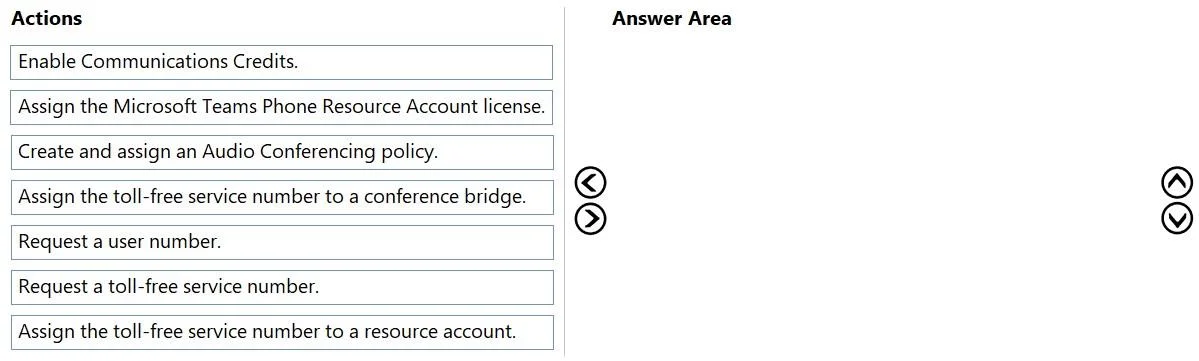
Answer Area
Drag items
Correct arrangement
- Enable Communications Credits.
- Request a toll-free service number.
- Assign the toll-free service number to a conference bridge.
- Create and assign an Audio Conferencing policy.
Explanation
To deploy a toll-free number for Teams meetings and ensure its prominent display in Outlook invitations, the correct sequence involves enabling billing, requesting the number, assigning it to a conference bridge, and then configuring an Audio Conferencing policy.
Approach. The correct sequence of actions, as depicted in the second image and logically derived from the scenario, is as follows:
-
Enable Communications Credits.
- Reasoning: Toll-free numbers, while free for the caller, incur charges for the organization receiving the calls. Communications Credits are Microsoft's billing mechanism to cover these pay-per-minute costs for services like toll-free dialing for Audio Conferencing, especially when usage exceeds any included bundle. This foundational step ensures that billing is in place before acquiring and using the service number.
-
Request a toll-free service number.
- Reasoning: You cannot assign or use a toll-free number until it has been acquired and provisioned in your Microsoft 365 tenant. This is the essential first step for obtaining the specific number needed for the meetings.
-
Assign the toll-free service number to a conference bridge.
- Reasoning: For a toll-free number to be used for Teams meetings, it must be assigned to an Audio Conferencing bridge. The conference bridge is the infrastructure component that facilitates dial-in access for meetings. Once the number is requested, linking it to the bridge makes it available for use in meetings.
-
Create and assign an Audio Conferencing policy.
- Reasoning: The requirement states that the toll-free number must 'display at the top of the invitation and at the top of a list of five toll numbers'. This level of customization for how dial-in information appears in meeting invitations is controlled by Audio Conferencing policies. These policies allow administrators to specify which numbers are included, their display order, and other settings relevant to the meeting experience. After the number is assigned to the bridge, the policy ensures it's presented correctly to users.
Common mistakes.
- common_mistake. Common mistakes include selecting irrelevant actions or misordering the steps. For instance:
- 'Request a user number': This is incorrect as the scenario specifically asks for a toll-free service number for meetings, not a number assigned directly to a user.
- 'Assign the Microsoft Teams Phone Resource Account license' or 'Assign the toll-free service number to a resource account': Resource accounts are primarily used for Auto Attendants and Call Queues in Teams Phone System, not directly for assigning numbers to an Audio Conferencing bridge for meetings. Confusing these different types of service numbers and their assignments is a common error.
- Incorrect order: Forgetting to enable Communications Credits first could lead to service interruptions or an inability to acquire the toll-free number. Trying to assign a number before requesting it, or trying to apply a policy before the number is assigned to a bridge, are also logical sequencing errors. Without assigning to a conference bridge (step 3), the number cannot function for meetings, and without the policy (step 4), the specific display requirement cannot be met.
Concept tested. Microsoft Teams Phone System Audio Conferencing setup, management of service numbers (specifically toll-free numbers), billing for communications services (Communications Credits), and configuration of Audio Conferencing policies for customizing meeting invitation details.
Topics
Community Discussion
No community discussion yet for this question.