
MS-721 · Question #286
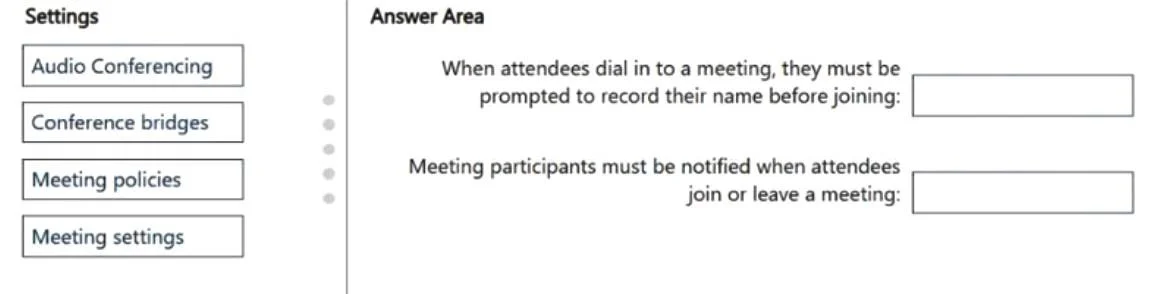
Drag and Drop Question You have a Microsoft Teams deployment. You need to enable Audio Conferencing for scheduled Teams meetings. The solution must meet the following requirements: - When attendees…
The correct answer is Conference bridges; Conference bridges. To fulfill the requirements of prompting dial-in attendees to record their name and notifying participants of attendees joining or leaving, the Conference bridges settings must be configured.
Question
Exhibit
Answer Area
Drag items
Correct arrangement
- Conference bridges
- Conference bridges
Explanation
To fulfill the requirements of prompting dial-in attendees to record their name and notifying participants of attendees joining or leaving, the Conference bridges settings must be configured.
Approach. To address both requirements, 'Conference bridges' should be dragged to both answer areas. In Microsoft Teams, the settings for conference bridges govern the behavior of dial-in attendees. Specifically, within the 'Conference bridges' settings in the Teams admin center, administrators can configure options such as 'Always ask callers to record their name' to meet the first requirement (prompting for name recording). Similarly, the 'Entry and exit announcement type' (e.g., 'Names and tones', 'Tones only') within the 'Conference bridges' settings directly controls whether meeting participants are notified when attendees join or leave, fulfilling the second requirement.
Common mistakes.
- common_mistake. Selecting 'Audio Conferencing' would be incorrect because while it's the overarching service, it doesn't provide granular controls for specific conference bridge behaviors like name prompts or entry/exit announcements. 'Meeting policies' are also incorrect; these policies typically manage user capabilities within meetings (e.g., screen sharing, recording, who can bypass the lobby) rather than the specific experience of dial-in participants on the conference bridge. 'Meeting settings' is a broader category that includes general meeting configurations (like anonymous join, email invitations) but not the detailed conference bridge experience. The specific behaviors described in the requirements are handled at the conference bridge level, not by general meeting or user policies, nor by the high-level service enablement.
Concept tested. Configuration of Microsoft Teams Audio Conferencing, specifically managing conference bridge settings for dial-in participant experience, including name recording prompts and entry/exit notifications.
Topics
Community Discussion
No community discussion yet for this question.