
MS-721 · Question #283
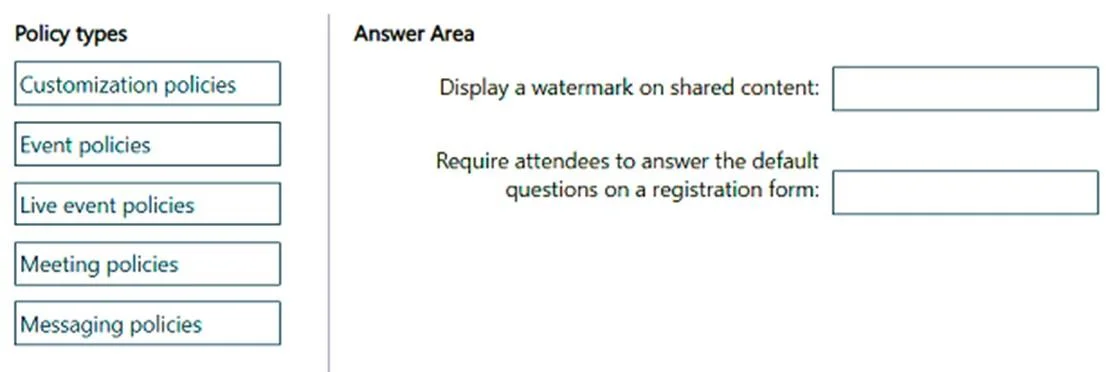
Drag and Drop Question You have a Microsoft Teams deployment that uses Teams Premium licensing. You need to configure Teams webinars to meet the following requirements: - Display a watermark on…
The correct answer is Meeting policies; Event policies. This question tests the understanding of Microsoft Teams policy types and their application to specific webinar features like watermarking and registration forms, especially with Teams Premium licensing.
Question
Exhibit
Answer Area
Drag items
Correct arrangement
- Meeting policies
- Event policies
Explanation
This question tests the understanding of Microsoft Teams policy types and their application to specific webinar features like watermarking and registration forms, especially with Teams Premium licensing.
Approach. To answer the question correctly, the test-taker must understand which policy type governs each specific webinar feature. For 'Display a watermark on shared content:', the correct policy type is 'Meeting policies'. Watermarking is a feature that applies to the actual content shared during a meeting or webinar session, and meeting policies control in-meeting experiences and security. For 'Require attendees to answer the default questions on a registration form:', the correct policy type is 'Event policies'. Registration forms are part of the event setup and management process, and 'Event policies' (which includes webinar policies) are used to configure these settings in Teams Premium. The solution correctly places 'Meeting policies' for watermarks and 'Event policies' for registration forms.
Common mistakes.
- common_mistake. Common mistakes would include selecting 'Live event policies' for registration instead of 'Event policies', as webinars are distinct from traditional Live Events and 'Event policies' specifically cover webinar settings. Another mistake would be confusing 'Meeting policies' with 'Event policies' and swapping them, attempting to use 'Event policies' for watermarking (which is an in-meeting feature) or 'Meeting policies' for registration (which is a pre-event setup feature). 'Customization policies' and 'Messaging policies' are incorrect because they pertain to branding/visuals and chat functionalities, respectively, not webinar-specific features like watermarking or registration forms.
Concept tested. The core technical concept being tested is the administrative management of Microsoft Teams, specifically the different policy types available (especially with Teams Premium) and their impact on configuring advanced webinar features like content watermarking and registration forms. It assesses knowledge of how to apply the correct administrative policy to achieve specific operational requirements in a Teams environment.
Topics
Community Discussion
No community discussion yet for this question.