
MS-721 · Question #219
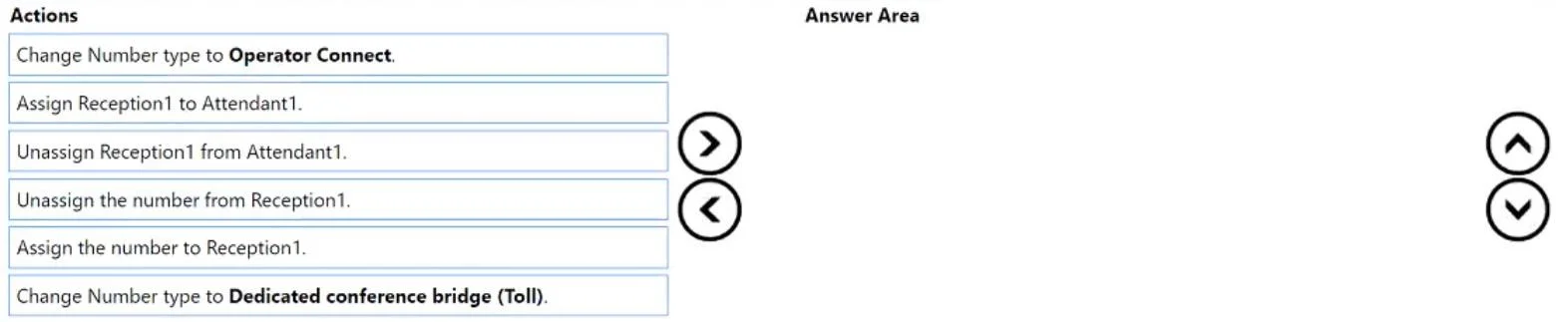
Drag and Drop Question You have a Teams Phone deployment. You port your company's main phone number from Teams Calling Plans to an Operator Connect provider. Currently, the number is assigned to a…
The correct answer is Unassign the number from Reception1.; Change Number type to Operator Connect; Assign the number to Reception1. To reconfigure a Teams phone number from Calling Plans to Operator Connect while maintaining its assignment to an auto attendant, you must first unassign the number, change its type, and then reassign it.
Question
Exhibit
Answer Area
Drag items
Correct arrangement
- Unassign the number from Reception1.
- Change Number type to Operator Connect
- Assign the number to Reception1.
Explanation
To reconfigure a Teams phone number from Calling Plans to Operator Connect while maintaining its assignment to an auto attendant, you must first unassign the number, change its type, and then reassign it.
Approach. The correct approach involves three sequential actions to reconfigure the phone number for Operator Connect while ensuring it remains functional with the existing auto attendant setup:
- Unassign the number from Reception1: Before a phone number's carrier type can be changed, or it can be ported, it must first be unassigned from any direct entity (like a user, resource account, or service) it is currently assigned to. This frees up the number for modification. The scenario states the number is currently assigned to
Reception1. - Change Number type to Operator Connect: Once the number is unassigned, its properties can be modified. The objective is to reconfigure it for Operator Connect, so this action updates the number's provider type from Teams Calling Plans to Operator Connect.
- Assign the number to Reception1: After the number's type has been successfully changed to Operator Connect, it needs to be reassigned to the
Reception1resource account. This ensures that theAttendant1auto attendant, which is configured to useReception1, continues to function correctly with the newly configured Operator Connect number.
Common mistakes.
- common_mistake. Common mistakes include choosing actions that are not relevant or performing them in the incorrect order:
- 'Change Number type to Dedicated conference bridge (Toll)': This action is incorrect because the goal is to reconfigure for 'Operator Connect', not for a conference bridge.
- 'Assign Reception1 to Attendant1' or 'Unassign Reception1 from Attendant1': The scenario states that 'Reception1 is assigned to an auto attendant named Attendant1'. The objective is to change the phone number's provider, not to alter the relationship between the resource account and the auto attendant. Breaking and re-establishing this link is unnecessary for the task.
- Changing the number type before unassigning it: Trying to change the number type while it's still assigned to a resource account will typically result in an error or is not allowed by the system, as the number is considered 'in use'.
- Assigning the number before changing its type: Assigning the number to
Reception1before changing its type to 'Operator Connect' would mean assigning it with the old (Calling Plans) configuration, which defeats the purpose of the reconfiguration.
Concept tested. The core concept being tested is the management of phone numbers in Microsoft Teams Phone System, specifically the lifecycle and dependencies involved when porting a number or changing its provider type (e.g., from Teams Calling Plans to Operator Connect) and how these numbers interact with resource accounts and auto attendants. It evaluates understanding of the sequence of administrative actions required for such reconfigurations.
Topics
Community Discussion
No community discussion yet for this question.