
MS-721 · Question #86
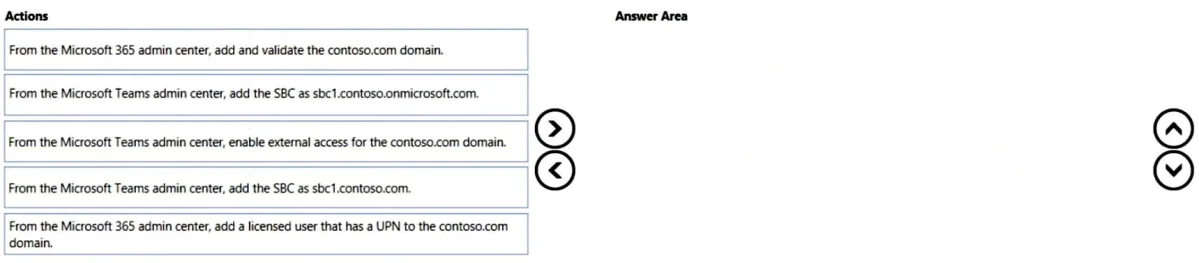
Drag and Drop Question You have a Microsoft Teams Phone deployment. When you attempt to deploy a Session Border Controller (SBC) named sfac1xontoso.com. you receive the following error message: "We…
The correct answer is From the Microsoft Teams admin center, upload the MAC address of the device; From the Microsoft Teams admin center, generate a verification code; Instruct the user to enter the verification code on the device; From the Microsoft Teams admin center, remotely sign-in a user to the device. To resolve the error about the domain not being set up and add an SBC for Teams Phone, the custom domain must first be added and validated in Microsoft 365, followed by associating a user with that domain, and finally adding the SBC itself in the Teams admin center.
Question
Exhibit
Answer Area
Drag items
Correct arrangement
- From the Microsoft Teams admin center, upload the MAC address of the device
- From the Microsoft Teams admin center, generate a verification code
- Instruct the user to enter the verification code on the device
- From the Microsoft Teams admin center, remotely sign-in a user to the device
Explanation
To resolve the error about the domain not being set up and add an SBC for Teams Phone, the custom domain must first be added and validated in Microsoft 365, followed by associating a user with that domain, and finally adding the SBC itself in the Teams admin center.
Approach. The core problem stated in the error message is that the domain 'contoso.com' (part of the SBC's FQDN 'sbc1.contoso.com') 'hasn't been set up in the organization.' This directs the initial step.
-
First Action: 'From the Microsoft 365 admin center, add and validate the contoso.com domain.' - This is the foundational step. Before any services or resources (like an SBC) can use a custom domain, that domain must be registered and validated in the Microsoft 365 tenant. This directly resolves the error message.
-
Second Action: 'From the Microsoft 365 admin center, add a licensed user that has a UPN to the contoso.com domain.' - For Direct Routing to function with a custom domain, the custom domain needs to be recognized as 'in use' for user identities. While not explicitly stated as a prerequisite for 'adding' the SBC, it's a critical step that ensures the custom domain is properly integrated for voice services and user provisioning, which typically precedes SBC configuration. This ensures that the domain is not just validated, but also actively used for user identities within the tenant.
-
Third Action: 'From the Microsoft Teams admin center, add the SBC as sbc1.contoso.com.' - Once the custom domain is validated and integrated (e.g., by associating it with a user's UPN), the SBC can then be successfully added to the Microsoft Teams tenant using its full FQDN which includes the custom domain. This is the final step to register the SBC for Direct Routing.
Common mistakes.
- common_mistake. 1. 'From the Microsoft Teams admin center, add the SBC as sbc1.contoso.onmicrosoft.com.' - This is incorrect because the problem explicitly states the SBC name is 'sbc1.contoso.com'. Using the default '.onmicrosoft.com' domain would circumvent the actual problem of the custom domain not being set up and wouldn't be the desired configuration for the specified SBC.
- 'From the Microsoft Teams admin center, enable external access for the contoso.com domain.' - Enabling external access (federation) for a domain allows Teams users in your organization to communicate with users in other organizations. While important for overall Teams functionality, it is not a prerequisite for adding an SBC for Direct Routing within your own tenant or for resolving a domain validation error. It's a separate configuration aspect.
- Incorrect Order: Attempting to add the SBC before the domain is validated, or before the domain is associated with user identities, would result in further errors or incomplete functionality, as the system would not recognize the custom domain as a valid part of your tenant for Direct Routing purposes.
Concept tested. Microsoft Teams Phone System Direct Routing prerequisites, Microsoft 365 domain management, Session Border Controller (SBC) configuration in Teams, and the sequence of administrative actions for tenant setup.
Topics
Community Discussion
No community discussion yet for this question.