
MS-721 · Question #223
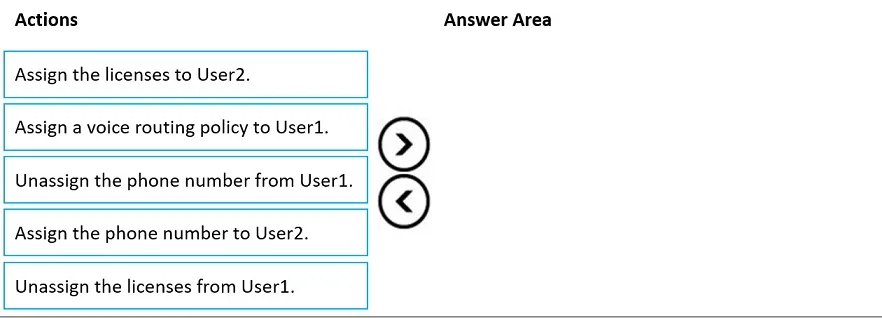
Drag and Drop Question You have a Teams Phone deployment that uses Direct Routing. You have two users named User1 and User2. You need to move the assigned licenses and phone number of User1 to…
The correct answer is Unassign the phone number from User1.; Unassign the licenses from User1.; Assign the licenses to User2.; Assign the phone number to User2. To move a phone number and associated licenses from one Teams user to another, first unassign both the phone number and licenses from the original user, then assign the licenses and subsequently the phone number to the new user in sequential order.
Question
Exhibit
Answer Area
Drag items
Correct arrangement
- Unassign the phone number from User1.
- Unassign the licenses from User1.
- Assign the licenses to User2.
- Assign the phone number to User2.
Explanation
To move a phone number and associated licenses from one Teams user to another, first unassign both the phone number and licenses from the original user, then assign the licenses and subsequently the phone number to the new user in sequential order.
Approach. The correct sequence of actions to move a phone number and licenses from User1 to User2 is:
- Unassign the phone number from User1. - This is the crucial first step. A phone number is a unique resource and cannot be assigned to two users simultaneously. It must be released from User1 before it can be assigned to User2.
- Unassign the licenses from User1. - After the phone number is unassigned, the associated licenses (e.g., Microsoft Teams Phone Standard, Microsoft 365 E5) should be unassigned from User1 to free them up and ensure User1 no longer consumes these resources. This also makes the licenses available for User2.
- Assign the licenses to User2. - User2 must have the appropriate Microsoft Teams Phone licenses assigned before a phone number can be assigned to them and before they can utilize Teams Phone features. Without the license, phone number assignment would fail.
- Assign the phone number to User2. - Once User2 has the required licenses and the phone number is free and available, it can then be assigned to User2. This completes the transfer of the phone number and calling capabilities.
Common mistakes.
- common_mistake. A common mistake is attempting to assign the phone number to User2 before it has been unassigned from User1. This will result in an error indicating the number is already in use. Another mistake is trying to assign the phone number to User2 before assigning the necessary Teams Phone licenses to User2; this would also fail as the user would not be provisioned for calling features. The action 'Assign a voice routing policy to User1' is incorrect because the objective is to move capabilities away from User1 and to User2, so assigning User1 a voice routing policy is not part of the transfer process and might imply User1 still has calling capabilities, which is contrary to the goal. Reversing the order of unassignment (e.g., unassigning licenses before the phone number) is technically possible but unassigning the phone number first is generally a more direct approach to free up the unique identifier before dealing with the licenses. For assignment, the license must precede the phone number.
Concept tested. Microsoft Teams Phone administration, specifically the sequential steps involved in managing user licenses and phone number assignments/unassignments within a Direct Routing deployment. This tests understanding of resource uniqueness (phone numbers) and license dependencies for voice functionality.
Reference. null
Topics
Community Discussion
No community discussion yet for this question.