
MS-721 · Question #233
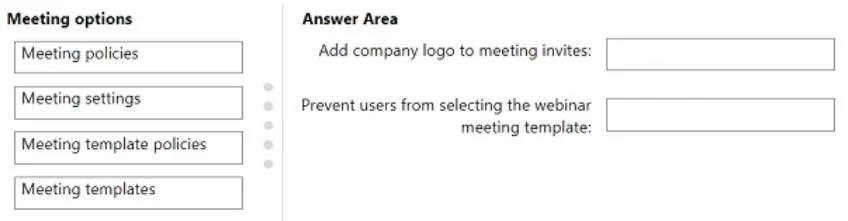
Drag and Drop Question Your company has a Microsoft Teams deployment. You need to configure meetings to meet the following requirements: - The company logo must be added to meeting invites. - Users…
The correct answer is Meeting settings; Meeting template policies. To add a company logo to meeting invites, configure Meeting settings; to prevent users from selecting a specific meeting template, configure Meeting template policies.
Question
Exhibit
Answer Area
Drag items
Correct arrangement
- Meeting settings
- Meeting template policies
Explanation
To add a company logo to meeting invites, configure Meeting settings; to prevent users from selecting a specific meeting template, configure Meeting template policies.
Approach. To meet the requirement 'Add company logo to meeting invites:', the correct option is 'Meeting settings'. In the Microsoft Teams admin center, tenant-wide branding for meeting invites, including the company logo, is configured under the 'Meeting settings' section. This is a global setting that applies to all meeting invitations generated within the organization. To meet the requirement 'Prevent users from selecting the webinar meeting template:', the correct option is 'Meeting template policies'. Meeting template policies are used by administrators to control which meeting templates (such as Webinar, Town Hall, or custom templates) are available or unavailable to specific users or groups of users in their Teams client. By configuring a meeting template policy, an administrator can effectively prevent users from seeing or selecting the webinar template.
Common mistakes.
- common_mistake. Using 'Meeting policies' for branding or template control is incorrect because meeting policies govern individual user capabilities within meetings (e.g., allowing chat, screen sharing, transcription) and are assigned per user, not for tenant-wide branding or template availability. 'Meeting templates' define the structure and pre-configured options for a specific meeting type but do not control who can use them; that is the role of 'Meeting template policies'. Therefore, 'Meeting templates' cannot be used to prevent users from selecting a template. Confusing tenant-wide settings ('Meeting settings') with user-assigned features ('Meeting policies') or template definitions ('Meeting templates') with template access control ('Meeting template policies') leads to incorrect selections.
Concept tested. Understanding the administrative areas and their scope within the Microsoft Teams admin center, specifically differentiating between Meeting policies, Meeting settings, Meeting templates, and Meeting template policies for configuring various aspects of Teams meetings and user experiences.
Topics
Community Discussion
No community discussion yet for this question.