
MB-800 · Question #214
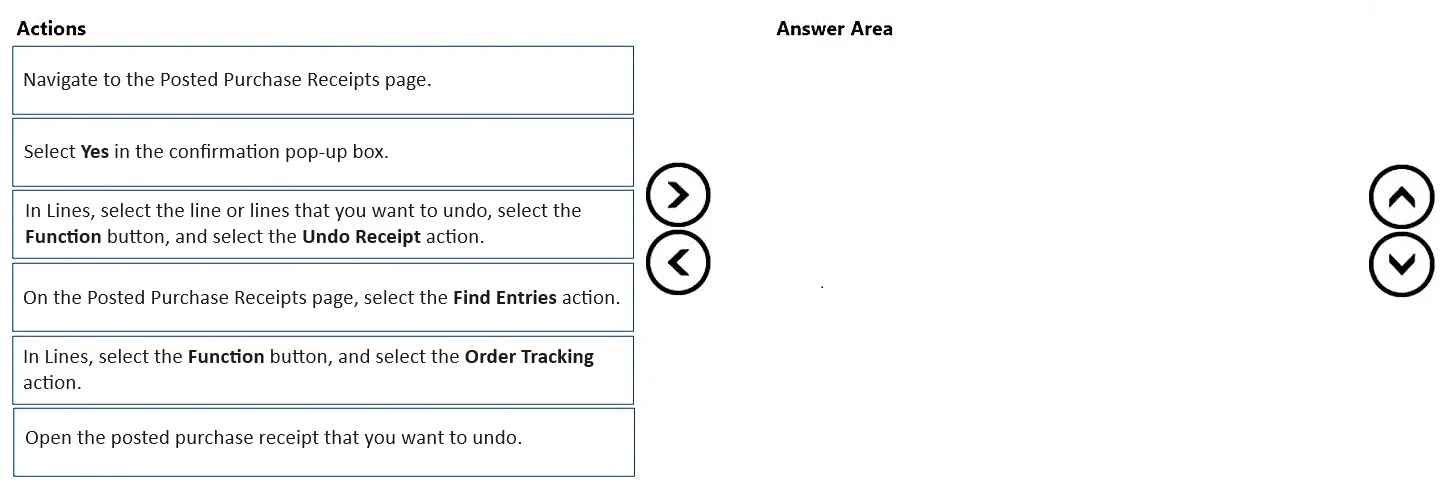
Drag and Drop Question A company uses Business Central. The operations team posts an incorrect quantity received on a purchase order. You need to undo the quantity posting on the posted purchase…
The correct answer is Navigate to the Posted Purchase Receipts page.; Open the posted purchase receipt that you want to undo.; In Lines, select the line or lines that you want to undo, select the Function button, and then select the Undo Receipt action.; Select Yes in the confirmation pop-up box. Undoing a Posted Purchase Receipt in Business Central The Correct Sequence & Why 1. Navigate to the Posted Purchase Receipts page. This is the mandatory starting point because the receipt has already been posted - it no longer lives in the active purchase order. You must go to…
Question
Exhibit
Answer Area
Drag items
Correct arrangement
- Navigate to the Posted Purchase Receipts page.
- Open the posted purchase receipt that you want to undo.
- In Lines, select the line or lines that you want to undo, select the Function button, and then select the Undo Receipt action.
- Select Yes in the confirmation pop-up box.
Explanation
Undoing a Posted Purchase Receipt in Business Central
The Correct Sequence & Why
1. Navigate to the Posted Purchase Receipts page.
This is the mandatory starting point because the receipt has already been posted - it no longer lives in the active purchase order. You must go to the historical/posted documents area to find it. Attempting to reverse a posting from within the open PO is impossible at this stage; the receipt posting created a separate, immutable document.
2. Open the posted purchase receipt that you want to undo.
You must open the specific receipt before any actions are available on it. The Undo Receipt function is context-sensitive - it only appears within the record itself, not from the list view. This is also where you can verify it's the correct receipt (date, vendor, quantity) before committing to the reversal.
3. In Lines, select the line(s), select the Function button, then select Undo Receipt.
This is the actual reversal action. It works at the line level, not the header, because a receipt may have multiple lines and you may only need to undo one of them. Selecting the Function button exposes document-level actions; Undo Receipt creates a corrective negative entry that cancels the quantity in inventory and the item ledger.
4. Select Yes in the confirmation pop-up box.
Business Central prompts for confirmation before executing any irreversible ledger correction. This is a standard safeguard. The action doesn't complete until you explicitly confirm - selecting Yes finalizes the reversal posting.
Why the Other Options Are Wrong
| Distractors | Why excluded |
|---|---|
| Find Entries action | This is a lookup/audit tool to trace ledger entries - useful for investigation, not for the undo workflow itself. |
| Order Tracking action | This shows supply/demand tracking links - completely unrelated to reversing a receipt posting. |
Common Mistakes
- Skipping step 2 (opening the receipt): Candidates assume you can undo from the list - you can't. The action requires being inside the document.
- Thinking the confirmation is optional: It's not a cosmetic step; without selecting Yes the undo does not post.
- Trying to undo from the purchase order: Once posted, the receipt is a separate document. The PO shows it as received but the correction must happen on the posted receipt, not the source order.
- Confusing this with credit memos: A purchase credit memo is used after invoicing. This Undo Receipt path is only valid before the invoice is posted - a key prerequisite the question explicitly states.
Topics
Community Discussion
No community discussion yet for this question.