
MB-800 · Question #211
Drag and Drop Question A company plans to set up an approval process for purchase orders in Business Central. The approval process must automatically send out an approval request as soon as a…
The correct answer is Workflow Notification Setup; Approval User Setup; Notification Schedule. Business Central Approval Workflow Configuration Context The question presents three use cases derived from the scenario requirements, and you must match each to the correct configuration area. The use cases are: | # | Use Case | Answer | |---|----------|--------| | 1 |…
Question
Exhibit
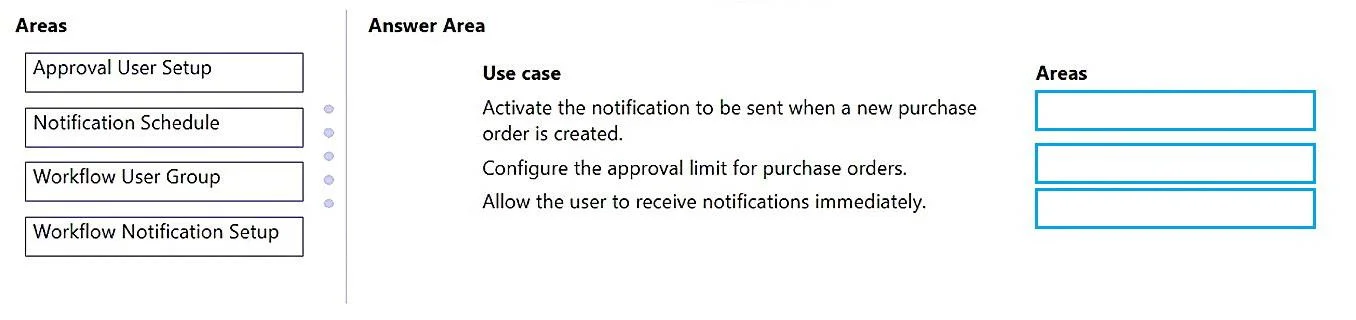
Answer Area
Drag items
Correct arrangement
- Workflow Notification Setup
- Approval User Setup
- Notification Schedule
Explanation
Business Central Approval Workflow Configuration
Context
The question presents three use cases derived from the scenario requirements, and you must match each to the correct configuration area. The use cases are:
| # | Use Case | Answer |
|---|---|---|
| 1 | Configure how approval notifications are delivered within the workflow | Workflow Notification Setup |
| 2 | Set the $600 minimum amount that triggers approval | Approval User Setup |
| 3 | Ensure notifications are sent immediately when a PO is created | Notification Schedule |
Item-by-Item Breakdown
1. Workflow Notification Setup → "How notifications are delivered"
This area controls the method and content of workflow notifications - e.g., whether users receive email or internal notes, and which template is used. It is the correct choice for configuring the notification mechanism tied to the workflow event (PO creation triggering an approval request).
2. Approval User Setup → "Amount threshold of $600"
This is where you configure per-user approval limits and chains. The $600 minimum approval amount is set here by defining each approver's approval limit. Any PO at or above that user's limit will route to the next approver. This is not a workflow event - it's a user-level financial threshold.
3. Notification Schedule → "Send immediately when PO is created"
This controls when the notification is dispatched - instantly, daily digest, or weekly. To satisfy "automatically send as soon as a purchase order is created," you set the schedule to Instantly here. Without this, a user might receive a batched/delayed notification even if the workflow fires correctly.
Why "Workflow User Group" is Not Used
This area defines multi-user approval groups for sequential or parallel routing. The scenario describes a straightforward approval chain with a single threshold, so no group structure is needed.
Common Mistakes
- Confusing Workflow Notification Setup with Notification Schedule: Setup defines what and how; Schedule defines when. Students often conflate them.
- Putting the $600 limit in the Workflow itself: The amount condition can appear in workflow event filters, but the per-approver limit is managed in Approval User Setup - that's the canonical place for financial thresholds.
- Forgetting Notification Schedule entirely: If you skip it, notifications may be configured but not sent immediately, violating the "as soon as created" requirement.
Topics
Community Discussion
No community discussion yet for this question.