
Microsoft
MB-800 · Question #210
Case Study 3 - Northwind Traders Background Northwind Traders is an independent, family-owned business. The company distributes natural pet products in the Northwest region of the country/region…
Sign in or unlock MB-800 to reveal the answer and full explanation for question #210. The question stem and answer options stay visible for context.
Purchasing
Question
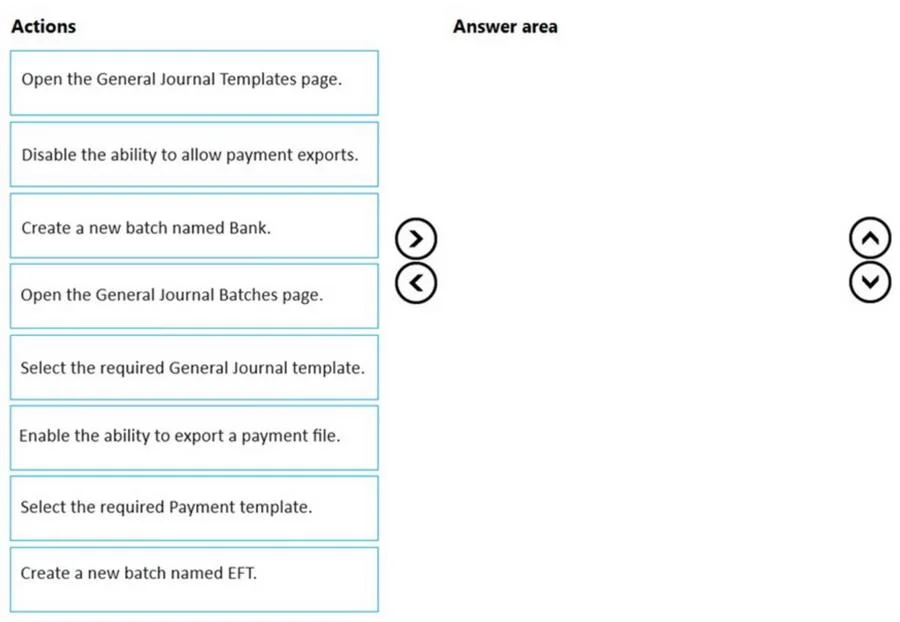
Case Study 3 - Northwind Traders Background Northwind Traders is an independent, family-owned business. The company distributes natural pet products in the Northwest region of the country/region. Products are purchased directly from manufacturers and distributed by using its own fleet of trucks. When the company started, deliveries were within a three-hour radius of the warehouse. Due to regional growth, current deliveries require drivers to stay overnight on some routes. The company plans to open a second warehouse to expand the region and eliminate overnights for route drivers. The company also plans to hire a second group of employees to run operations in this new location. The finance and accounting teams will remain in the original location. The company uses a third-party system for financials and order management. The finance department stated that the company's fiscal year begins on July 1 and ends on June 30. The mm/dd/yyyy date format is used. As part of the expansion, the owner plans to upgrade to an ERP system and use Business Central to fulfill the company requirements and manage growth. Current environment Orders Orders are emailed to customer service and manually keyed into the inventory system. Pricing and discounts - Customer pricing is determined by the customer market type. Customer market types are Retail, Veterinarian, and Breeder. Each customer is associated with only one market type. - Vendors offer monthly promotions to customers by item, brand, or item category. - Invoices should show each customer's base price, the discount amount, and the net price. Accounts payable The company wants to expand vendor payment options in the new system. Requirement Customers The sales team must be able to do the following: - Quickly set up new customers with the proper settings based on customer type. - Identify customers by market type. Customer posting groups will be used to identify which market the customer belongs to. - Base price is determined by the customer market type. - The sales department should receive a warning when entering the order if a customer is over their credit limit. Sales - Customer discounts are offered for specific time frames by item, brand, or product category. Discounts should be added to sales lines automatically. - Discounts must post to a unique general ledger (G/L) account. - The business needs to be able to track revenue by location, market, and product category dimensions. Locations 100 and 200 will be set as default dimensions on the two warehouse locations. Food, treats, toys, and supplies are the required product categories, which will be set as default dimensions on the item cards. Each customer card will have a default market dimension. - The sales manager wants to delete canceled orders and automatically archive them. Warehouse - Orders will be fulfilled from two possible warehouse locations. - Product will be transferred between locations by using transfer orders. Sales invoices - Invoices will be posted after delivery. - Invoices will be emailed to the customer. - The sales department must be able to quickly correct posted invoices for the following scenarios: - Posted invoices that have not been paid. - Posted invoices that have been paid. - Posted invoices created from sales orders. - Posted invoices not created from sales orders. Accounting - The finance department requires that the company has 12 monthly accounting periods per fiscal year. - Finance department users must be able to reconcile the accounts receivable (AR) subledger to the G/L account at month end. - AR department users need the ability to settle and close invoices when customers take payment discounts after the payment discount date has passed. AR users should be allowed to accept or reject the payment tolerance. - Accounts payable (AP) department users must be able to pay vendors by electronic funds transfer (EFT) and use a payment journal batch named EFT to process payments. - When viewing G/L entries, the finance and accounting teams must be able to see debits and credits instead of a positive or negative amount. - The company needs to be able to track expenses by department and location. The departments are sales, operations, and administration. - AR must be able to correct cash application entries. Issues Payment application - Customers may have several stores that are responsible for their own orders and payments. - Occasionally, AR clerks mistakenly apply payments to the incorrect customer invoice. Invoicing - When items are delivered, customers refuse the items for reasons such as damaged or wrong item. - After the invoices are posted, they must be corrected, which is time-consuming. Warehouse The sales department and warehouse managers must have visibility into products that are in the process of being transferred between locations. Accounts - Customer accounts are difficult to view by market type. - The finance team does not have the ability to report revenue by customer type. Accounting - AR users often find variances between the AR subledger and G/L account. - Customers often take the payment discount after the payment discount date has passed, leaving open invoices for small amounts. - The AP department is unable to pay vendors by EFT in the current system. - Finance and accounting team members have trouble validating postings when they use only the amounts field on G/L entries. - The finance department is unable to run financial reports by market. All revenue postings must reference a market. Drag and Drop Question You need to configure Business Central to pay vendors as required by the AP team. Which five actions should you perform in sequence? To answer, move the appropriate actions from the list of actions to the answer area and arrange them in the correct order. Answer:
Exhibit
Answer Area
Drag items
Select Retail in the Customer posting group filter.Select Retail in the Gen. Bus. Posting Group filter.Open the Customer List Page.Save the view.Open the Filter pane.
Unlock MB-800 to see the answer
You've previewed enough free MB-800 questions. Unlock MB-800 for full answers, explanations, the timed quiz mode, progress tracking, and the master PDF. Question stem and options stay visible so you can still see what's on the exam.
Topics
#EFT payment#vendor payment setup#payment journal batch#AP configuration