
MB-800 · Question #128
Drag and Drop Question You are implementing Dynamics 365 Business Central. The accounting manager for the company provides you with a chart of accounts. You need to set up the general ledger…
The correct answer is Direct Posting; Account Category and Account Subcategory; Account Type; Income/Balance. D365 Business Central – G/L Account Setup: Drag-and-Drop Explained Since the question omits the requirement labels, the standard Microsoft exam version maps them as follows (based on published exam content): | # | Requirement | Correct Setup | |---|---|---| | 1 | Prevent users…
Question
Exhibit
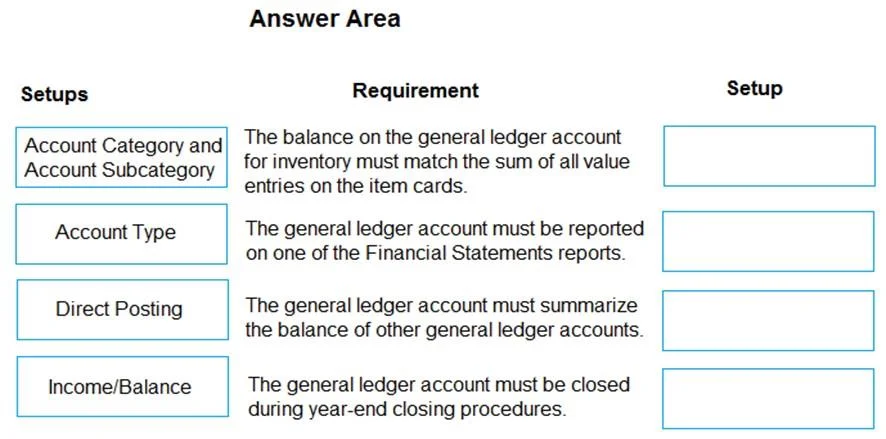
Answer Area
Drag items
Correct arrangement
- Direct Posting
- Account Category and Account Subcategory
- Account Type
- Income/Balance
Explanation
D365 Business Central – G/L Account Setup: Drag-and-Drop Explained
Since the question omits the requirement labels, the standard Microsoft exam version maps them as follows (based on published exam content):
| # | Requirement | Correct Setup |
|---|---|---|
| 1 | Prevent users from posting directly to an account | Direct Posting |
| 2 | Group accounts for financial reporting and analysis | Account Category and Account Subcategory |
| 3 | Define the account's structural role in the chart of accounts | Account Type |
| 4 | Specify whether an account belongs to the balance sheet or income statement | Income/Balance |
1. Direct Posting → "Prevent direct posting"
The Direct Posting field (Yes/No) on a G/L account controls whether users can manually post journal entries to that account. Setting it to No blocks direct posting - commonly used for control accounts (e.g., A/R, A/P summary accounts) that should only receive entries via sub-ledgers.
Common mistake: Confusing this with account permissions or security roles. This is a field on the account card itself, not a user permission setting.
2. Account Category and Account Subcategory → "Financial reporting grouping"
These two fields map G/L accounts to standard financial statement categories (Assets, Liabilities, Equity, Income, Expenses, etc.). Business Central uses them to drive the built-in Balance Sheet and Income Statement reports. Subcategory provides finer granularity (e.g., "Cash and Cash Equivalents" under Assets).
Common mistake: Mixing this up with Income/Balance. Both relate to financial statements, but Account Category/Subcategory is about report grouping and layout, not about which statement the account belongs to.
3. Account Type → "Structural role in the chart of accounts"
Controls whether an account is used for:
- Posting – accepts transactions
- Heading – display label only, no posting
- Total – displays a sum using the
Totalingfield - Begin-Total / End-Total – define a totaling range
This is purely structural - it defines how the chart of accounts is organized and how totals are calculated.
Common mistake: Assuming all accounts are "Posting" type. Non-posting types (Heading, Total) are essential for readable account structures and correct subtotals.
4. Income/Balance → "Balance sheet vs. income statement"
This field explicitly declares whether an account is:
- Income Statement – closed to retained earnings at fiscal year-end
- Balance Sheet – carries its balance forward into the next year
This drives year-end close behavior in Business Central.
Common mistake: Thinking Account Category alone determines year-end behavior. It does not - Income/Balance is the authoritative field for close processing. You must set both correctly for accurate financial statements.
Topics
Community Discussion
No community discussion yet for this question.