nerdexam
Microsoft

MB-800 · Question #127

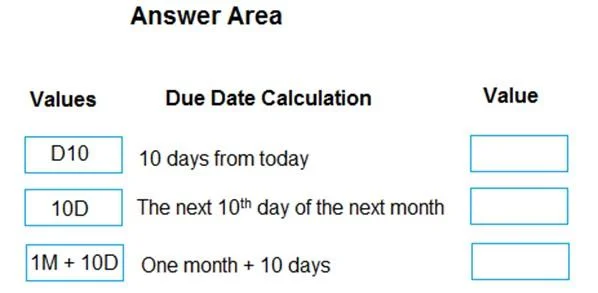
Drag and Drop Question A company uses Dynamics 365 Business Central. You need to configure payment terms with the correct due date calculation formula. What should you do? To answer, drag the…

The correct answer is Open the Dimensions Combinations page.; Select the dimensions combination and set the option to Limited.; Open the Dimension Value Combinations page.; Select the dimension value combinations and set the option to Blocked. Note on Question Mismatch The question stem mentions payment terms / due date calculation, but the answer items are entirely about Dimension Combinations. This is a common exam question bank error - the stem and answer set belong to different questions. The explanation below…

Configure financials

Question

Drag and Drop Question A company uses Dynamics 365 Business Central. You need to configure payment terms with the correct due date calculation formula. What should you do? To answer, drag the appropriate values to the correct requirements. Each value may be used once, more than once, or not at all. You may need to drag the split bar between panes or scroll to view content. NOTE: Each correct selection is worth one point. Answer:

Exhibit
MB-800 question #127 exhibit

Answer Area

Drag items

Open the Dimensions Combinations page.Select the dimensions combination and set the option to Limited.Open the Dimension Value Combinations page.Select the dimension value combinations and set the option to Blocked.

Correct arrangement

  • Open the Dimensions Combinations page.
  • Select the dimensions combination and set the option to Limited.
  • Open the Dimension Value Combinations page.
  • Select the dimension value combinations and set the option to Blocked.

Explanation

Note on Question Mismatch

The question stem mentions payment terms / due date calculation, but the answer items are entirely about Dimension Combinations. This is a common exam question bank error - the stem and answer set belong to different questions. The explanation below covers what the answer items actually describe.


What This Is Actually About

This sequence configures restrictions on dimension combinations in Business Central - preventing users from posting entries that use incompatible dimension value pairs.


Step-by-Step Breakdown

Step 1 - Open the Dimensions Combinations page

This is the entry point. The Dimensions Combinations page controls whether two dimensions (e.g., Department + Project) are allowed to be used together at all. You must start here before you can drill into value-level restrictions.

Step 2 - Select the combination and set it to Limited

Setting a dimension pair to Limited (rather than Blocked) means: "these two dimensions can appear together, but only for approved value pairs." This opens the door for the next step. If you set it to Blocked here, no values from those two dimensions could ever be combined - too broad. Limited is the surgical option.

Step 3 - Open the Dimension Value Combinations page

With the dimension pair set to Limited, you now drill into the value-level grid. This page lists every possible pairing of individual dimension values (e.g., SALES + PROJ-001). You can only reach meaningful restrictions here after Step 2.

Step 4 - Select the value combination and set it to Blocked

Here you block the specific value pairs that should never be used together. This is the actual enforcement point - users posting a journal entry with a blocked value pair will get an error.


Common Mistakes

MistakeWhy It's Wrong
Setting the dimension combination to Blocked in Step 2Blocks all value pairs, not specific ones - too restrictive
Skipping Step 2 and going straight to value combinationsYou can't selectively block values unless the parent combination is set to Limited first
Confusing Dimensions Combinations with Dimension Value CombinationsThe first is dimension-to-dimension; the second is value-to-value within that pair

The flow is: dimension-level gate (Limited) → value-level enforcement (Blocked).

Topics

#payment terms#due date calculation#date formula#financial setup

Community Discussion

No community discussion yet for this question.

Full MB-800 Practice