
MB-500 · Question #99
Drag and Drop Question You are a Dynamics 365 Finance developer. You need to use the Extensible Data Security (XDS) framework to restrict access to the data in the Sales table form based on the…
The correct answer is Create a query to define filters.; Create a security policy that links to the query and primary table.; Define the list of constrained tables. XDS Framework: Drag-and-Drop Explanation Background Extensible Data Security (XDS) in Dynamics 365 Finance enables row-level data filtering based on security policies. Unlike role-based security (which controls access to forms/menus), XDS controls which rows of data a user can…
Question
Exhibit
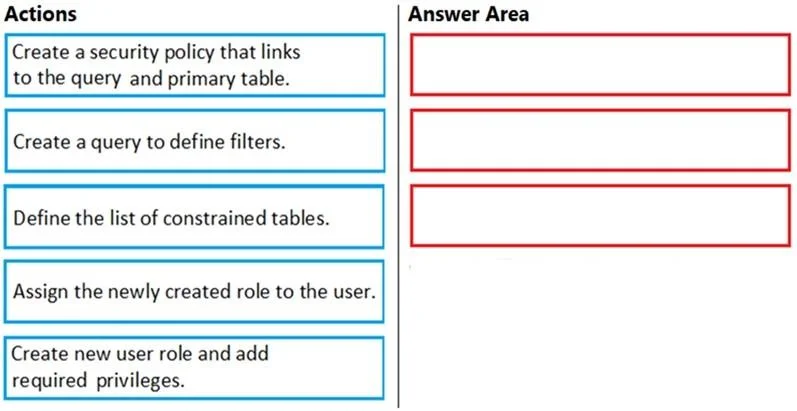
Answer Area
Drag items
Correct arrangement
- Create a query to define filters.
- Create a security policy that links to the query and primary table.
- Define the list of constrained tables.
Explanation
XDS Framework: Drag-and-Drop Explanation
Background
Extensible Data Security (XDS) in Dynamics 365 Finance enables row-level data filtering based on security policies. Unlike role-based security (which controls access to forms/menus), XDS controls which rows of data a user can see within those forms.
Correct Sequence & Why
1. Create a query to define filters
Why first: The query is the foundation of XDS. It contains the filter logic - in this case, filtering Sales data by customer group. The security policy cannot exist without referencing a query, so this must come first. You cannot link something that doesn't yet exist.
Think of it as: the query answers "What data should be visible and under what conditions?"
2. Create a security policy that links to the query and primary table
Why second: The policy is the binding object that connects:
- The filter query (built in step 1)
- The primary table (Sales table)
- The roles the policy applies to
It must come after the query because it references it directly. The policy is what the XDS framework actually enforces at runtime.
Think of it as: the policy answers "Apply this query's filter to this table, for these roles."
3. Define the list of constrained tables
Why third: This step happens within or after the security policy is created. Constrained tables tell the policy which additional tables should also have rows filtered (related tables beyond the primary). You must have the policy object created before you can add tables to its constrained list.
Think of it as: the constrained tables answer "Extend this filter to these related tables too."
Why the Other Two Items Are Excluded
| Item | Why It's Not in the XDS Setup Sequence |
|---|---|
| Create new user role and add required privileges | Standard role-based security setup - separate from XDS. XDS policies reference roles but don't require you to create them as part of XDS configuration. |
| Assign the newly created role to the user | Standard user administration, not part of XDS framework implementation. |
Common Mistakes
- Swapping steps 1 and 2: Candidates sometimes think the policy is created first, then the query attached later. Wrong - the query must pre-exist so the policy can reference it.
- Skipping step 3: Candidates forget that the primary table in the policy alone isn't sufficient - related/constrained tables must be explicitly added or joins won't be filtered.
- Including role/user steps: XDS is a data security layer, not a role management task. The distractor items belong to a different part of the security setup process.
Topics
Community Discussion
No community discussion yet for this question.