
MB-500 · Question #169
Drag and Drop Question You are a Dynamics 365 Finance developer. Users can view customers from all customer groups on the customer form. You need to ensure that users can only see customers who…
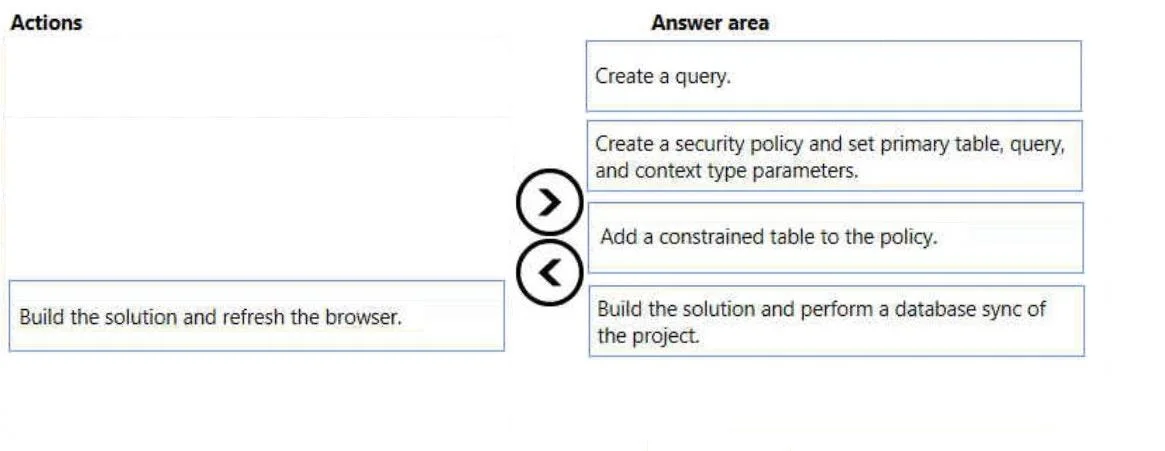
The correct answer is Create a query.; Create a security policy and set primary table, query, and context type parameters.; Add a constrained table to the policy.; Build the solution and perform a database sync of the project. Dynamics 365 Finance: Row-Level Security via Extensible Data Security (XDS) This question is about implementing Extensible Data Security (XDS) - D365F's framework for row-level security that filters records at the database level based on policy rules. --- Why This Order? XDS…
Question
Exhibit
Answer Area
Drag items
Correct arrangement
- Create a query.
- Create a security policy and set primary table, query, and context type parameters.
- Add a constrained table to the policy.
- Build the solution and perform a database sync of the project.
Explanation
Dynamics 365 Finance: Row-Level Security via Extensible Data Security (XDS)
This question is about implementing Extensible Data Security (XDS) - D365F's framework for row-level security that filters records at the database level based on policy rules.
Why This Order?
XDS has hard dependencies between its components. Each step produces an artifact the next step requires.
Step-by-Step Breakdown
1. Create a query.
The query defines the data relationship that drives the filter - in this case, linking customers to their customer group. You must build this first because the security policy object requires a query reference during configuration. You cannot set up the policy without a query to point it at.
2. Create a security policy and set primary table, query, and context type parameters.
Now that the query exists, you create the Security Policy AOT object and wire it up:
- Primary table: the table that provides security context (e.g., the customer group table)
- Query: the query from step 1
- Context type: controls when the policy fires (e.g.,
Application= always,RoleProperty= role-based)
This must come before adding constrained tables because the policy object itself must exist first.
3. Add a constrained table to the policy.
The constrained table is the table whose rows will actually be filtered - here, CustTable. Adding it to the existing policy tells XDS: "apply this policy's filter when someone queries this table." This depends on step 2 being complete because you're modifying a policy that must already exist.
4. Build the solution and perform a database sync.
XDS policies are enforced at the SQL layer - D365F generates database views and filters to implement them. A database sync pushes those schema changes to the database. Without it, the policy exists in AOT metadata only and is never enforced at runtime.
Common Mistakes / Misconceptions
| Mistake | Why it's wrong |
|---|---|
| Choosing "Build and refresh the browser" instead of database sync | Browser refresh only reloads UI/client cache. XDS is a database-level construct - it requires schema sync, not a page reload. |
| Creating the security policy before the query | The policy setup requires you to reference a query - if it doesn't exist yet, you can't complete step 2. |
| Adding the constrained table before creating the policy | There is no policy object to attach it to yet. |
| Skipping database sync entirely | The policy will exist in metadata but will have no effect - rows will still be visible to all users. |
Mental Model
Think of it as: define the filter logic (query) → define the policy rules → specify what to filter (constrained table) → push to the database.
Topics
Community Discussion
No community discussion yet for this question.