
MB-500 · Question #98
Drag and Drop Question A company uses Dynamics 365 Unified Operations. You need to implement role-based security for a set of fields in a table. How should you arrange the security elements? To…
The correct answer is Role; Duty; Privilege. Dynamics 365 Unified Operations: Role-Based Security Hierarchy --- The Core Concept Dynamics 365 F&O security is a top-down containment hierarchy. Higher-level elements contain lower-level elements, and users are assigned at the top. For field-level security, you work through…
Question
Exhibit
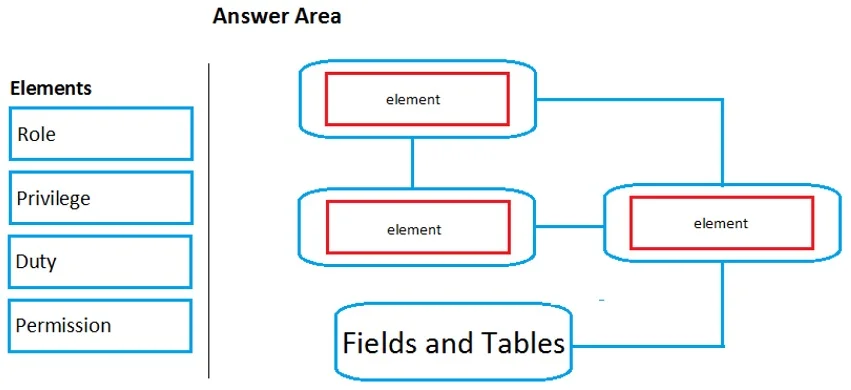
Answer Area
Drag items
Correct arrangement
- Role
- Duty
- Privilege
Explanation
Dynamics 365 Unified Operations: Role-Based Security Hierarchy
The Core Concept
Dynamics 365 F&O security is a top-down containment hierarchy. Higher-level elements contain lower-level elements, and users are assigned at the top. For field-level security, you work through this chain:
Role → Duty → Privilege → (Permission on field)
The question tests whether you understand the order of these containers.
Item-by-Item Placement
Position 1: Role
A Role is the entry point - it is what gets assigned directly to a user. Roles represent a job function or organizational responsibility (e.g., Accounts Payable Clerk). Roles do not directly grant access; they aggregate Duties. This must be first because it is the only element users are assigned to.
Common mistake: Thinking users are assigned Privileges or Duties directly. They are not - only Roles are assigned to users.
Position 2: Duty
A Duty sits inside a Role and represents a discrete business responsibility (e.g., Maintain vendor invoices). Duties group related Privileges together. This is the organizational layer - it maps to what the user is responsible for, not what objects they can touch.
Common mistake: Conflating Duty with Privilege. A Duty is a logical grouping of tasks; a Privilege is a specific technical access grant.
Position 3: Privilege
A Privilege sits inside a Duty and grants access to perform a specific action (e.g., View customer records). Privileges directly contain the Permissions that reference securable objects like table fields. This is the lowest configurable security container shown in the answer.
Common mistake: Thinking Privileges are at the top. They are near the bottom - they are fine-grained and reusable across multiple Duties.
Why "Permission" Is Not in the Arrangement
Permission is the atomic grant on a specific securable object (a table field, menu item, etc.). It lives inside a Privilege in the AOT. The question is asking you to arrange the security elements used to implement role-based security, not to list every layer including the underlying AOT permissions. The three containers - Role, Duty, Privilege - are what you configure in the Security workspace; Permissions are the low-level grants those Privileges already define.
Summary Table
| Level | Element | Contains | Assigned To |
|---|---|---|---|
| 1 | Role | Duties | Users |
| 2 | Duty | Privileges | Roles |
| 3 | Privilege | Permissions | Duties |
| 4 | Permission | Securable objects (fields) | Privileges |
The correct drag order - Role → Duty → Privilege - reflects this top-down hierarchy where each element is a container for the one below it.
Topics
Community Discussion
No community discussion yet for this question.