
MB-500 · Question #397
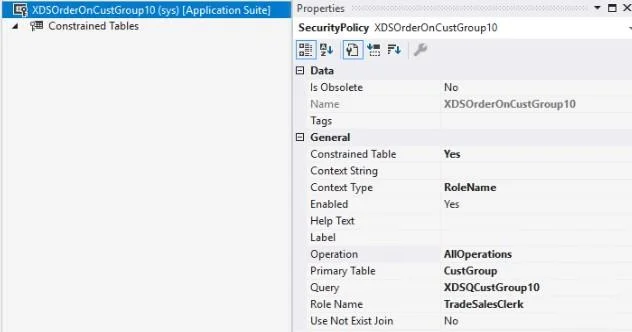
A company uses Dynamics 365 Finance. The company requires a new security policy to restrict access to sales data specific to each sales manager. The policy must ensure that users can access only the…
The correct answer is A. Set the RoleName as the context type property. B. Link the security policy to the Sales manager role by using the RoleName property. Context - Controls the conditions under which a policy is applicable. Two main types of contexts Role context: Based on the roles that the user is assigned. There are two suboptions for role RoleName - Indicates that the security policy is only applied to the application user…
Question
Exhibit
Options
- ASet the RoleName as the context type property.
- BLink the security policy to the Sales manager role by using the RoleName property.
- CAssign the Sales manager role in the ContextString property of the security policy.
- DSet the RoleProperty as the context type property.
How the community answered
(23 responses)- A65% (15)
- C22% (5)
- D13% (3)
Explanation
Context - Controls the conditions under which a policy is applicable. Two main types of contexts * Role context: Based on the roles that the user is assigned. There are two suboptions for role ** RoleName - Indicates that the security policy is only applied to the application user assigned to the role equal to the value of RoleName. ** RoleProperty - This value is used in combination with the ContextString property to specify multiple user roles context. It's applied when the Context String value defined in the Role Property field for the policy is the same as the ContextString field value for the assigned user Note: Add a new security policy 1. Add a new security policy, such as XDSCustTableOnCustGroup10. 2. Set Constrained Table to Yes. This will also secure access to the primary table. In this example this is the CustGroup table. *-> 3. Set the Context Type field to RoleName. [A] 4. Set the Enabled field to Yes. 5. Set the Operation field to AllOperations. Other available values for Operation include Select, Insert, Update, Delete, and InsertUpdateDelete. 6. Set Primary Table field to CustGroup. 7. Set the Query field to the name of the query created above, for example 'XDSQCustGroup10'. *-> 8. Set the Role Name field to 'TradeSalesClerk'. Because Context Type is set to RoleName for this policy, it is required to enter the AOT name for a user role. [B] 9. Next, add constrained tables. 10. As a final step, it is required that you build and synchronize the solution to activate the policy. https://learn.microsoft.com/en-us/dynamics365/fin-ops-core/dev-itpro/sysadmin/extensible-data- security-policies https://learn.microsoft.com/en-us/dynamics365/fin-ops-core/dev-itpro/sysadmin/create-simple-
Topics
Community Discussion
No community discussion yet for this question.