
MB-500 · Question #398
Drag and Drop Question A company uses Dynamics 365 Finance. You create a form in the Accounts Payable module where a list of customers and their bank accounts is displayed. You also create a display…
The correct answer is Create an extension of the Accounts Payable clerk role and add the duty.; Create a duty and add the privilege.; Add the privilege to the Accounts Payable clerk role. Dynamics 365 Finance Security Configuration - Explanation Important note: The "Correct Arrangement" as listed appears to contain an error - it references adding a duty to a role before that duty exists, and step 3 adds a privilege directly to a role (bypassing the duty…
Question
Exhibit
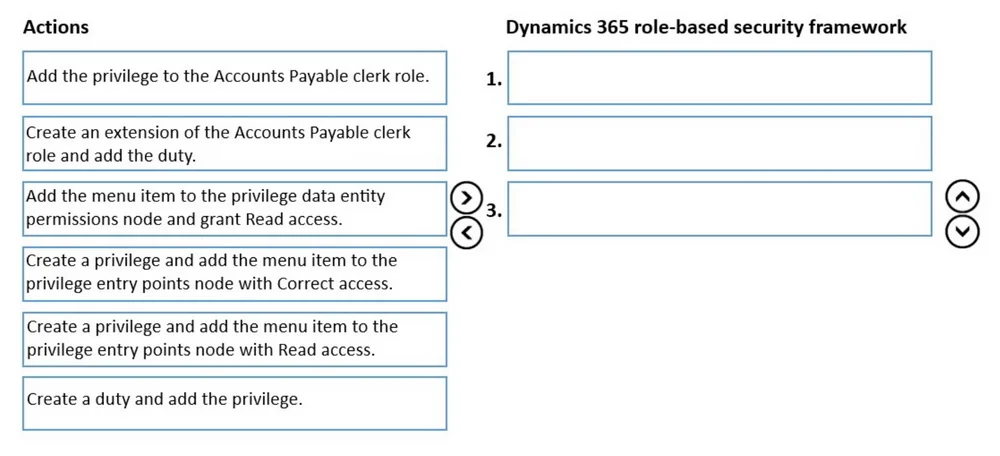
Answer Area
Drag items
Correct arrangement
- Create an extension of the Accounts Payable clerk role and add the duty.
- Create a duty and add the privilege.
- Add the privilege to the Accounts Payable clerk role.
Explanation
Dynamics 365 Finance Security Configuration - Explanation
Important note: The "Correct Arrangement" as listed appears to contain an error - it references adding a duty to a role before that duty exists, and step 3 adds a privilege directly to a role (bypassing the duty entirely). I'll explain both the logical correct answer and what went wrong.
The D365 Finance Security Hierarchy
The model flows strictly in one direction:
Role → Duty → Privilege → Entry Points (Menu Items)
You must build bottom-up: create the smallest unit first, then compose upward.
What the Correct Sequence Should Be
Step 1 - Create a privilege and add the menu item to the privilege entry points node with Read access
Why first: A privilege is the most granular security unit. It grants access to specific objects (menu items, forms, data entities). The requirement says "only view the records," which maps to Read access on the entry point - not Correct (which grants update/edit rights). The display menu item you created goes here.
Why not "Correct access": Correct access in D365 means the user can modify records. The requirement is view-only.
Why not the data entity permissions node: The data entity node controls programmatic/OData access. For a form accessed via a menu item, you use entry points.
Step 2 - Create a duty and add the privilege
Why second: A duty is a collection of privileges representing a business task (e.g., "View vendor bank accounts"). You can't add a privilege to a duty that doesn't exist yet, so the privilege must exist first. This duty is what will represent "AP clerk can access this form."
Step 3 - Create an extension of the Accounts Payable clerk role and add the duty
Why third: The AP clerk role is a standard Microsoft-delivered role. Best practice (and upgrade safety) requires you to extend it rather than modify it directly. You then attach the duty to that extension. You can't add a duty that doesn't exist yet, so the duty must be created first.
Why not "Add the privilege to the Accounts Payable clerk role": This bypasses the duty entirely, violates the security hierarchy, and means you're adding granular permissions directly to a role - skipping the duty abstraction layer that the question explicitly requires you to create.
Why the Listed "Correct Arrangement" is Problematic
| Listed Step | Problem |
|---|---|
| 1. Extend role and add the duty | The duty doesn't exist yet - can't add it |
| 2. Create a duty and add the privilege | The privilege doesn't exist yet either |
| 3. Add privilege directly to role | Skips the duty; contradicts the requirement to use a duty |
This ordering is logically inverted. It's likely a transcription or exam source error.
Common Mistakes to Avoid
- Confusing Read vs. Correct on entry points: Read = view only. Correct = edit. This is a frequent exam trap.
- Modifying standard roles directly: Always extend Microsoft roles - direct edits get overwritten on upgrades.
- Adding privileges directly to roles: Roles should contain duties; duties contain privileges. Skipping duties breaks the intended abstraction.
- Data entity node vs. entry points node: Entry points = UI access (forms, menu items). Data entity = API/OData access. A display form uses entry points.
Topics
Community Discussion
No community discussion yet for this question.