
MB-500 · Question #386
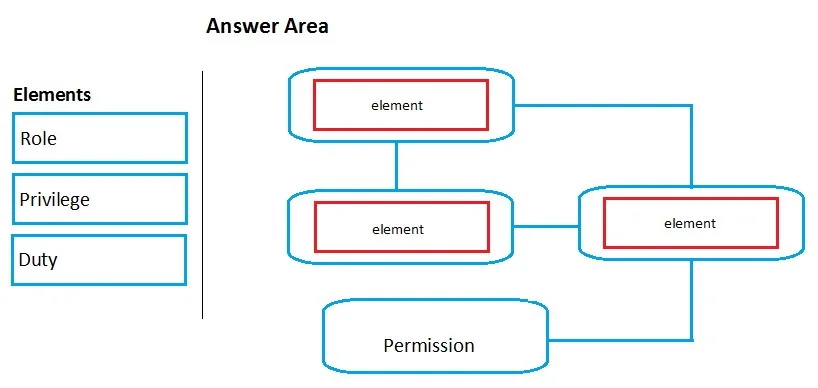
Drag and Drop Question A company uses Dynamics 365 Finance. You need to implement role-based security for a set of fields in a table. How should you arrange the security elements? To answer, drag…
The correct answer is Role; Duty; Privilege; Permission. Dynamics 365 Finance: Role-Based Security Hierarchy The Correct Arrangement (Top → Bottom) `` Role → Duty → Privilege → Permission ` This is the security hierarchy in Dynamics 365 Finance. Each level contains the one below it. --- Why Each Item Goes in That Position 1. Role…
Question
Exhibit
Answer Area
Drag items
Correct arrangement
- Role
- Duty
- Privilege
- Permission
Explanation
Dynamics 365 Finance: Role-Based Security Hierarchy
The Correct Arrangement (Top → Bottom)
Role → Duty → Privilege → Permission
This is the security hierarchy in Dynamics 365 Finance. Each level contains the one below it.
Why Each Item Goes in That Position
1. Role (Position 1 - Top)
Assigned directly to users. A Role represents a job function (e.g., Accounts Payable Clerk, Controller). It is the entry point - you never assign Duties or Privileges directly to a user. Roles are the outermost container that D365 checks when a user attempts an action.
2. Duty (Position 2)
Assigned to Roles. A Duty represents a business responsibility or process (e.g., Maintain vendor invoices). One Role can contain many Duties. Duties are the recommended level for customization when modeling business processes - they map cleanly to job responsibilities.
3. Privilege (Position 3)
Assigned to Duties. A Privilege grants access to a specific task or UI artifact (e.g., a single form, menu item, or operation). One Duty bundles multiple related Privileges. This is the lowest level where you typically group functional access.
4. Permission (Position 4 - Bottom)
Assigned to Privileges. A Permission is the atomic security grant on a specific securable object - including individual table fields (Read, Update, Create, Delete, Correct, No Access). For field-level security specifically, you define Permissions directly on fields and attach them to a Privilege.
The Full Chain for Field Security
User
  └── Role
        └── Duty
              └── Privilege
                    └── Permission (on a specific field: e.g., NoAccess)
Common Mistakes
| Mistake | Why It's Wrong |
|---|---|
| Assigning Duties directly to users | D365 doesn't support this - only Roles are assigned to users |
| Confusing Privilege and Permission | Privileges are containers; Permissions are the actual grants on objects |
| Swapping Duty and Privilege order | Duties are broader business tasks; Privileges are narrower technical access points - Duty always wraps Privilege |
| Thinking Roles grant access directly | Roles contain no direct permissions - all access flows through Duty → Privilege → Permission |
The key mental model: Role is about who you are, Duty is about what you do, Privilege is about what you access, Permission is about how much access you have.
Topics
Community Discussion
No community discussion yet for this question.