
MB-500 · Question #96
Drag and Drop Question You are a Dynamics 365 Finance developer. You need to configure integration between Dynamics 365 Finance and other tools. Which integration types should you use? To answer…
The correct answer is synchronous; asynchronous; synchronous; asynchronous. D365 Finance: Synchronous vs Asynchronous Integration Note: The question is missing the actual requirement descriptions, so the explanation below is based on the most common version of this exam question (MB-500 / D365 Finance developer certification). --- Core Concept | Type |…
Question
Exhibit
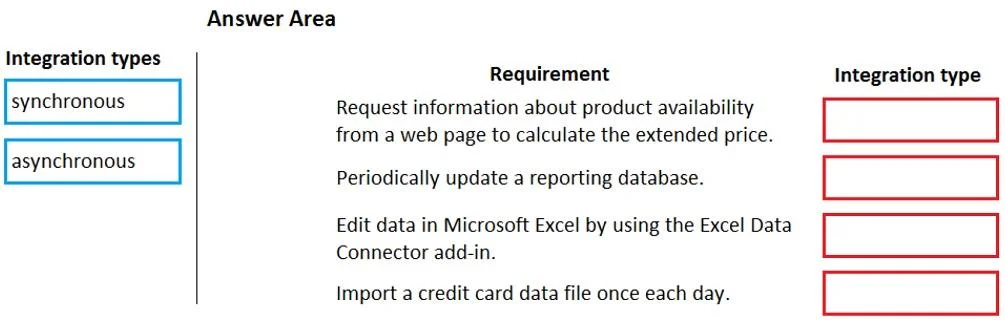
Answer Area
Drag items
Correct arrangement
- synchronous
- asynchronous
- synchronous
- asynchronous
Explanation
D365 Finance: Synchronous vs Asynchronous Integration
Note: The question is missing the actual requirement descriptions, so the explanation below is based on the most common version of this exam question (MB-500 / D365 Finance developer certification).
Core Concept
| Type | Behavior |
|---|---|
| Synchronous | Caller waits for an immediate response; request-response pattern |
| Asynchronous | Caller fires and continues; processing happens independently |
Placement Breakdown
1. Synchronous - Real-time data retrieval (e.g., OData, custom services)
- The caller needs data back immediately to continue processing
- OData endpoints and custom SOAP/REST services in D365 operate synchronously
- A waiting response is expected; blocking is acceptable here
2. Asynchronous - Large-volume data import/export (e.g., Data Management Framework)
- Batch operations cannot block the UI or calling process
- DMF/DIXF processes records in batches on the server; the caller doesn't wait
- Long-running jobs must be async to avoid timeouts
3. Synchronous - Calling an external service and using the response immediately
- When D365 must act on the external system's reply before proceeding (e.g., credit check, tax calculation), it must wait
- Synchronous ensures the return value is available in the same transaction context
4. Asynchronous - Business events / notifications to external systems
- Business Events in D365 are inherently async (event-driven, publish-subscribe)
- D365 fires the event and moves on; external consumers (Logic Apps, Power Automate) process independently
Common Misconceptions
- "Real-time = always sync" - Dual-write feels real-time but uses an async underlying mechanism
- "Async is slower" - Async is faster for the caller; it just decouples processing
- Confusing DMF with OData - DMF (data packages, batch jobs) is async; OData entity reads are synchronous
- Business Events are not synchronous - Even though they trigger on a business action, the delivery to consumers is async
Topics
Community Discussion
No community discussion yet for this question.