
MB-500 · Question #95
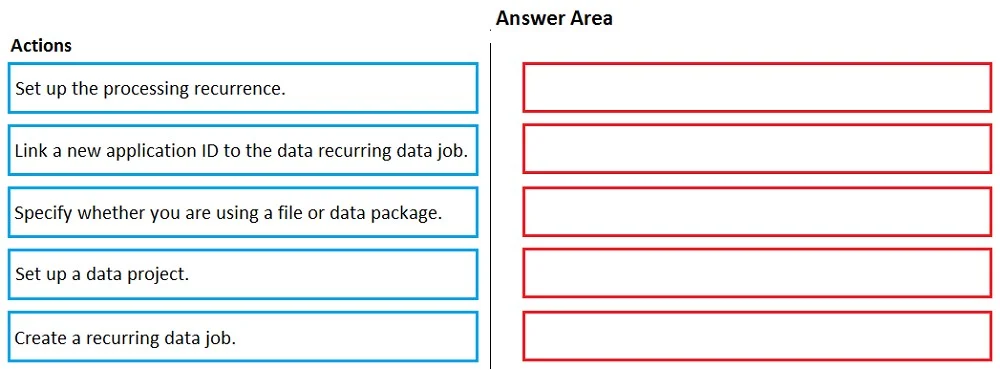
Drag and Drop Question You need to set up a recurring integration to enable file exchanges between Dynamics 365 Finance and a third-party system. In which order should you perform the actions? To…
The correct answer is Set up a data project.; Create a recurring data job.; Link a new application ID to the data recurring data job.; Specify whether you are using a file or data package.; Set up the processing recurrence. Dynamics 365 Finance: Recurring Integration Setup Order This question tests your knowledge of the Data Management Framework (DMF) in D365F, specifically the recurring integration feature used for file-based data exchange with external systems. --- Why This Order? The sequence…
Question
Exhibit
Answer Area
Drag items
Correct arrangement
- Set up a data project.
- Create a recurring data job.
- Link a new application ID to the data recurring data job.
- Specify whether you are using a file or data package.
- Set up the processing recurrence.
Explanation
Dynamics 365 Finance: Recurring Integration Setup Order
This question tests your knowledge of the Data Management Framework (DMF) in D365F, specifically the recurring integration feature used for file-based data exchange with external systems.
Why This Order?
The sequence follows a logical dependency chain: you must have a container before you can configure what goes in it, and you must configure the job before you can schedule it.
Step-by-Step Breakdown
1. Set up a data project A data project is the foundation. It defines the entities (data structures) involved in the exchange. Nothing else can exist without this - the recurring job needs a data project to attach to. Think of it as creating the "template" for what data will move.
2. Create a recurring data job With the data project in place, you create a recurring data job that wraps that project for scheduled/automated execution. This generates the job endpoint and prepares it for external system access. You cannot configure recurrence or authentication before the job exists.
3. Link a new application ID to the recurring data job This step handles authentication/authorization. You register an Azure AD application ID so the third-party system has a secure identity to call the D365F endpoint. This must come after job creation because you're linking to the job, and before the file configuration because authorization must be established before defining the data exchange method.
4. Specify whether you are using a file or data package Once the job is secured, you define the data exchange format - either a flat file (CSV, XML, etc.) or a full data package. This is a property of the job's integration channel, configured after the auth identity is in place.
5. Set up the processing recurrence This is the scheduling step - setting the interval (hourly, daily, etc.) for automatic execution. It's last because you're scheduling an already-fully-configured job. You need all prior settings finalized before telling the system when to run it.
Common Mistakes
- Swapping steps 3 and 4: Candidates often think file format comes before the application ID. The app ID is about access, which is a prerequisite to defining how data flows.
- Creating the recurring job before the data project: The recurring job has no purpose without an underlying data project - this dependency is frequently overlooked.
- Putting recurrence early: Recurrence is purely a schedule trigger; setting it before the job is fully configured would schedule an incomplete process.
Topics
Community Discussion
No community discussion yet for this question.