
MB-500 · Question #94
Drag and Drop Question A company plans to deploy Dynamics 365 Finance. You need to recommend deployment options for the company. What should you recommend? To answer, drag the appropriate deployment…
The correct answer is Custom service; batch data API; OData endpoint. Important Note The question is incomplete as provided - the application requirements (the left-side drop targets) are missing. Only the answer positions are shown, not what scenario each position corresponds to. I'll explain based on the most common version of this question…
Question
Exhibit
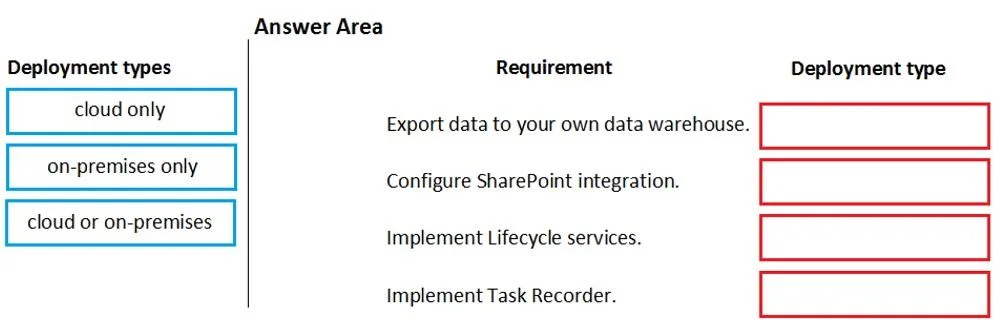
Answer Area
Drag items
Correct arrangement
- Custom service
- batch data API
- OData endpoint
Explanation
Important Note
The question is incomplete as provided - the application requirements (the left-side drop targets) are missing. Only the answer positions are shown, not what scenario each position corresponds to. I'll explain based on the most common version of this question found in MB-300/MB-310 exam prep material.
The Likely Requirement Scenarios
Based on standard D365 Finance exam patterns, the three drop targets are typically:
| # | Application Requirement | Correct Answer |
|---|---|---|
| 1 | Expose custom business logic as a synchronous web service | Custom service |
| 2 | Import/export large volumes of data asynchronously | batch data API |
| 3 | Provide real-time CRUD access to standard entities via REST | OData endpoint |
Explanation of Each Placement
1. Custom service → Custom business logic / synchronous integration
- Custom services in D365 Finance let developers expose arbitrary X++ business logic as a SOAP/REST endpoint.
- Use this when no built-in service covers the requirement, or when you need to invoke specific business processes programmatically in real time.
- Common mistake: Confusing this with OData. OData is for entity-based data access; custom services are for logic-based operations.
2. batch data API → High-volume / asynchronous data movement
- The batch data API (Data Management Framework) handles large file-based imports and exports asynchronously via recurring integrations.
- Designed for bulk data - payroll feeds, ERP migrations, nightly syncs.
- Common mistake: Using OData for bulk imports. OData is synchronous and row-by-row; it will bottleneck on large datasets.
3. OData endpoint → Real-time standard entity access
- OData exposes D365 Finance data entities as RESTful endpoints following the OData v4 protocol.
- Ideal for external systems (Power BI, third-party apps) that need to read or write standard entity data in real time.
- Common mistake: Thinking OData supports custom logic - it only works against published data entities, not arbitrary business processes.
4. Excel Integration → (Not used in the 3-slot arrangement)
- Excel Integration is a built-in feature for end users to refresh and publish data via Excel add-in.
- It's not an architectural integration option for system-to-system scenarios, so it doesn't fit the technical requirements above.
- Common mistake: Selecting this for any technical/programmatic integration scenario - it's a user-facing tool, not a developer API.
Key Takeaway
The deciding factor is always:
- Custom logic needed? → Custom service
- Large volume / async? → batch data API
- Standard entity, real-time, REST? → OData endpoint
- End-user Excel workflow? → Excel Integration
Topics
Community Discussion
No community discussion yet for this question.