
MB-500 · Question #93
Drag and Drop Question A company uses Dynamics 365 Supply Chain Management. You need to integrate the system with third-party applications. Which data integration strategies should you use? To…
The correct answer is Custom service; batch data API; OData endpoint. D365 Supply Chain Management: Data Integration Strategies > Note: The scenario descriptions (what each numbered slot requires) are missing from your question. The answer only shows the correct mapping. I'll explain based on the standard exam scenarios this question type uses…
Question
Exhibit
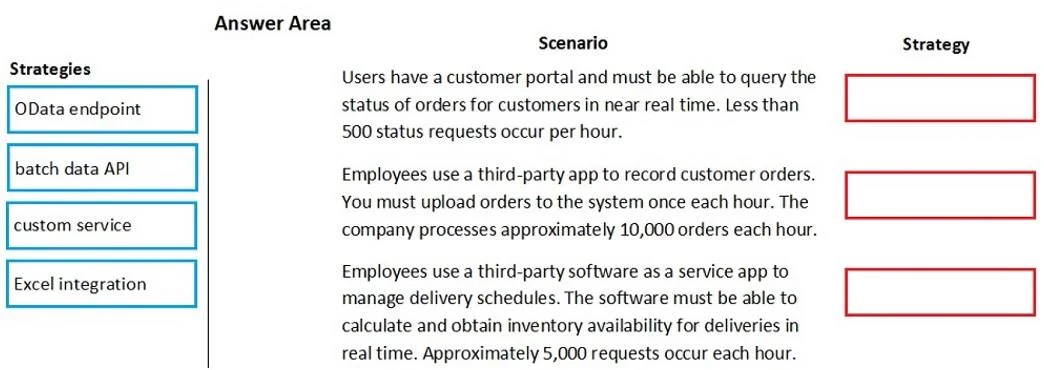
Answer Area
Drag items
Correct arrangement
- Custom service
- batch data API
- OData endpoint
Explanation
D365 Supply Chain Management: Data Integration Strategies
Note: The scenario descriptions (what each numbered slot requires) are missing from your question. The answer only shows the correct mapping. I'll explain based on the standard exam scenarios this question type uses.
The Three Standard Scenarios & Why Each Answer Fits
Slot 1 → Custom Service
Typical scenario: A third-party application needs to trigger a specific business operation or workflow in real-time that doesn't map to a standard entity.
Why Custom Service:
- Exposes custom business logic via a SOAP/REST endpoint you define
- Runs synchronously - the caller gets an immediate response
- Use when the operation requires server-side logic, validation, or multi-table orchestration that OData can't handle
- Think: "trigger a release to warehouse" or "calculate a custom price" on demand
Slot 2 → Batch Data API (Data Management Framework)
Typical scenario: A third-party system needs to import or export large volumes of data on a scheduled or periodic basis.
Why Batch Data API:
- Built for high-throughput, asynchronous bulk operations (thousands to millions of records)
- Uses the Data Management Framework (DMF) - jobs run in the background
- Supports import/export packages, BYOD (Bring Your Own Database), recurring integrations
- The caller does not wait for a response; they poll for job completion
- Think: nightly product catalog sync, inventory snapshot exports
Slot 3 → OData Endpoint
Typical scenario: A third-party application needs to read and write standard entity records in real-time (CRUD operations).
Why OData:
- Exposes standard D365 data entities over HTTP using the OData protocol
- Supports
GET,POST,PATCH,DELETEon published entities - Synchronous and stateless - ideal for real-time lookups or record creation
- No custom code needed; entities are published through the entity list
- Think: external portal creating sales orders, querying on-hand inventory
Why Excel Integration Is Not Used Here
Excel Integration is a user-facing tool (Power BI / Excel Add-in) for manual data entry and review by business users. It is not a system-to-system integration strategy for third-party applications. Exams frequently include it as a distractor.
Common Mistakes
| Mistake | Correction |
|---|---|
| Choosing OData for bulk data | OData is for real-time CRUD; bulk loads will time out or throttle |
| Choosing Batch API for real-time calls | Batch is async - callers can't get an immediate result |
| Using Custom Service when OData covers the entity | If a standard entity exists, OData is simpler and preferred |
| Confusing Excel Integration as a programmatic API | It's end-user tooling, not an API integration pattern |
The core decision rule: real-time + custom logic → Custom Service | bulk/async → Batch Data API | real-time + standard entity → OData.
Topics
Community Discussion
No community discussion yet for this question.