
MB-500 · Question #101
Drag and Drop Question You are a Dynamics 365 Finance developer. You need configure table caching. Which CacheLookup properties should you use? To answer, drag the CacheLookup properties to the…
The correct answer is EntireTable; NotInTTS; Found; FoundAndEmpty. D365 Finance: Table CacheLookup Properties > Note: The question as presented is missing the table scenario descriptions for each position. However, I'll explain each property thoroughly so you understand which scenario maps to which property - and why. --- The Four CacheLookup…
Question
Exhibit
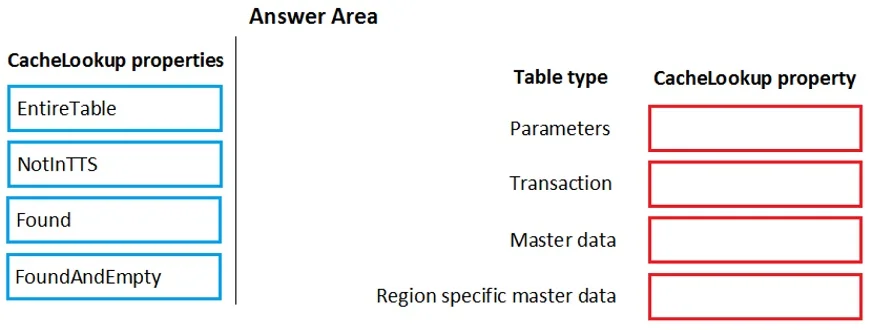
Answer Area
Drag items
Correct arrangement
- EntireTable
- NotInTTS
- Found
- FoundAndEmpty
Explanation
D365 Finance: Table CacheLookup Properties
Note: The question as presented is missing the table scenario descriptions for each position. However, I'll explain each property thoroughly so you understand which scenario maps to which property - and why.
The Four CacheLookup Properties
1. EntireTable (Position 1)
The entire table is loaded into the application server's memory cache on the first read, and subsequent lookups are served from cache.
- Use when: The table is small (few records) and rarely or never modified - e.g., currency codes, unit of measure tables, or parameter tables.
- Key behavior: Any write operation invalidates the entire cache.
- Common mistake: Using this on large or frequently updated tables causes severe memory pressure and stale data issues.
2. NotInTTS (Position 2)
Records are cached outside of a TTS (Transaction Time Stamp / database transaction) block, but the cache is bypassed while inside a transaction.
- Use when: You want caching for performance during normal reads, but need to guarantee fresh data during a database transaction to avoid dirty reads.
- Key behavior: The moment
ttsBeginis called, cached records are ignored and a fresh DB read occurs. - Common mistake: Confusing this with
Found-NotInTTSis specifically about transaction safety, not about negative-result caching.
3. Found (Position 3)
Only the most recently fetched record is cached, and only if the record was found (exists in the DB).
- Use when: You have a large table where repeated lookups for the same record are common, but you don't want to waste cache space on "not found" results.
- Key behavior: Single-record cache. A "not found" result is not cached - the DB is hit every time for a missing record.
- Common mistake: Using this when your code frequently looks up records that don't exist - each miss still hits the database, defeating the purpose.
4. FoundAndEmpty (Position 4)
Caches both found records AND empty (not found) results.
- Use when: Your code repeatedly looks up records that may or may not exist, and you want to avoid DB hits for both cases.
- Key behavior: A "not found" result is cached as an empty record marker, preventing redundant DB queries for non-existent keys.
- Common mistake: Treating this as identical to
Found- the critical difference is the caching of negative results, which matters a lot in validation-heavy scenarios.
Quick Reference
| Property | Caches "Found" | Caches "Not Found" | Entire Table | TTS Safe |
|---|---|---|---|---|
EntireTable | Yes (all) | N/A | Yes | No |
NotInTTS | Yes | No | No | Yes |
Found | Yes | No | No | No |
FoundAndEmpty | Yes | Yes | No | No |
Key Misconception to Avoid
FoundAndEmpty is not a superset of Found in terms of performance - caching empty results can cause stale negative results if a record is later inserted. Always consider write frequency when choosing between the two.
Topics
Community Discussion
No community discussion yet for this question.