Question
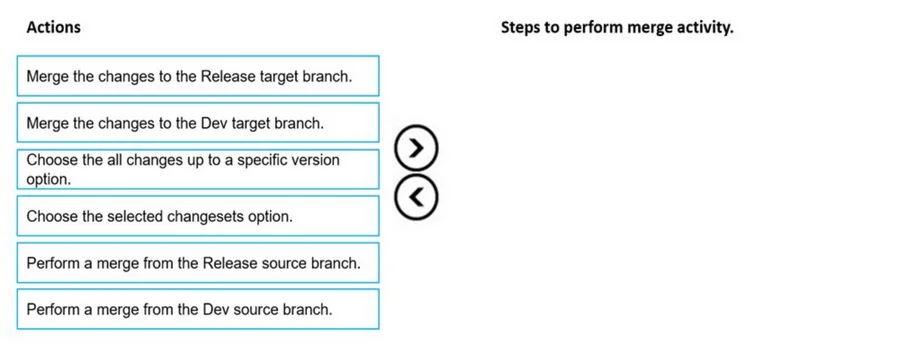
Case study 4 - ADatum Corporation Background ADatum Corporation is a market leader in the design and distribution of innovative aluminum systems. The company provides services to the architectural, residential, industrial, and home improvement markets in Australia. The company has warehouses in Perth. Sydney, and Melbourne. A team of warehouse employees provides delivery to the customer sites. Current Environment ADatum Corporation currently uses Microsoft Dynamics AX 2009. Customers use email or phone calls to place orders. After the company provides a quote to customers, the customer must agree to the sale price before the company places a sales order. The company is migrating to Dynamics 365 Finance and Dynamics 365 Supply Chain Management using a phased rollout strategy to its sites. The company has the Lifecycle services project to manage various environments and releases. The company has the following Finance and Supply Chain Management environments: - Development - Quality assurance (QA) - User acceptance testing (UAT) - Production The company uses Azure DevOps for a code repository. All developers use a development branch to check in code and a release branch to maintain the code for production releases. Requirements. General - Configure a cloud-based development environment for Finance and Supply Chain Management. Enable a code extension that supports updates. - Configure Microsoft-supported version control and an Azure-hosted build pipeline. - Migrate all document handling attachments for the customers to Finance and Supply Chain Management from Dynamics AX 2009. - Audit X++ code for a best practice check. - All new code must be unit tested in a development environment and then validated by the QA team before the code is merged into the Release branch for further releases. Requirements. Business processes - All changes that are deployed to the UAT environment must be approved for code release to production. - The sales manager requires a solution that is extensible to ensure that new master tables document handling attachments are migrated to the new system. - A base class named MigrateAttachment must be designed with methods that all child classes must implement. - A method named processAttachment must be created so that extenders are not able to subscribe to pre-events and post-events. - On the All sales orders list page, two new fields must be added for the total sales order amount. One field uses goods and services tax (GST) and the other field does not use GST. - A process named Populate check data must be designed based on the following: The process must run from the All customers list page and populate a custom table named CustCheckData with 1000 rows. The table must have two fields named CheckNumber and BankNumber. The process must return to the current session after the data is processed. - The generated check data must be available for users to access in a tabular form without additional details and preview panes. - The purchase manager requires a new data entity to send out the information for purchase order inquiries that are generated in Finance and Supply Chain Management - The sales manager must be able to access the total quotation for the sites and item types. - The sales manager requires a quotation number to be printed on the sales invoice business document. Customers must be able to access the reference number on the invoice documents. - The purchase manager requires a new approval workflow for approving purchase orders that are more than $10,000. Requirements. Business systems - After a user named UserA posts a packing slip for a sales order, customers must be informed of the product delivery in real-time. This information is provided using business events. - Purchase order inquiries must be exported from the Finance and Supply Chain Management using data packages. Users must be able to query using OData but should not be able to update or create the data in the system. - A sales manager's workspace must display the total quotations using key performance indicators. - The purchase order approval workflow must be configured from the procurement and sourcing module. Issues - UserA reports delays when opening the All sales orders list page. - A customer is unable to access the business events for a packing slip that is posted by UserA. - A user named UserB reports that the system is unresponsive when they run the Populate check data process for a customer. - UserA reports that the print management settings in the accounts receivable module do not display the new layout when testing a new sales invoice report layout in the UAT environment. Drag and Drop Question You must merge the code change that you performed and which was tested by QA to the production environment. You need to merge a specific changeset. Which three actions should you perform in sequence? To answer, move the appropriate actions from the list of actions to the answer area and arrange them in the correct order. Answer:
Explanation
Explanation: Merging a Specific Changeset from Dev to Release
Context
ADatum uses two branches:
- Dev branch - where developers check in code
- Release branch - maintained for production releases
The workflow is: code is written in Dev → tested by QA → merged to Release → deployed to production. The task here is to get QA-validated code into the Release branch using TFVC (Team Foundation Version Control) in Azure DevOps.
Why This Sequence
Step 1: Perform a merge from the Dev source branch
Dev is the source because that is where the code was written and where QA validated it. The merge operation must originate from Dev - it holds the changeset you want to promote. Choosing Release as the source (the distractor option) is backwards; Release is the destination, not where the new code lives yet.
Step 2: Choose the "all changes up to a specific version" option
Once you select the source branch, TFVC asks what to merge. This option lets you specify a version ceiling - merge everything from the source branch up to and including the specific changeset QA approved. This is the correct way to target a validated build without cherry-picking. The distractor - "selected changesets" - is for cherry-picking individual, non-contiguous changesets and introduces risk of missing dependent changes. Since QA tested a full build up to a specific version, "all changes up to a specific version" is the appropriate choice.
Step 3: Merge the changes to the Release target branch
Only after defining source and scope do you specify the target. Release is the branch maintained for production releases, so it is the correct destination. Merging to the Dev target branch (the distractor) makes no sense here - Dev is already where the code came from.
Common Mistakes
| Mistake | Why It's Wrong |
|---|
| Picking Release as the source | Code lives in Dev; Release is the destination |
| Choosing "selected changesets" | This cherry-picks individual commits; you want all changes up to the tested version |
| Targeting Dev instead of Release | You're promoting to Release for production, not back to Dev |
| Reversing steps 1 and 2 | You must select the source branch first before TFVC presents merge scope options |
One-Line Summary
From Dev → scope to tested version → into Release. Source first, scope second, target last.