
MB-500 · Question #299
Case study 4 - ADatum Corporation Background ADatum Corporation is a market leader in the design and distribution of innovative aluminum systems. The company provides services to the architectural…
The correct answer is A. Details master C. Simple List. Scenario: Requirements. Business processes A process named Populate check data must be designed based on the following: The process must run from the All customers list page and populate a custom table named CustCheckData with 1000 rows. The table must have two fields named…
Question
Exhibit
Options
- ADetails master
- BSimple List and Details
- CSimple List
- DList page
How the community answered
(47 responses)- A77% (36)
- B6% (3)
- D17% (8)
Explanation
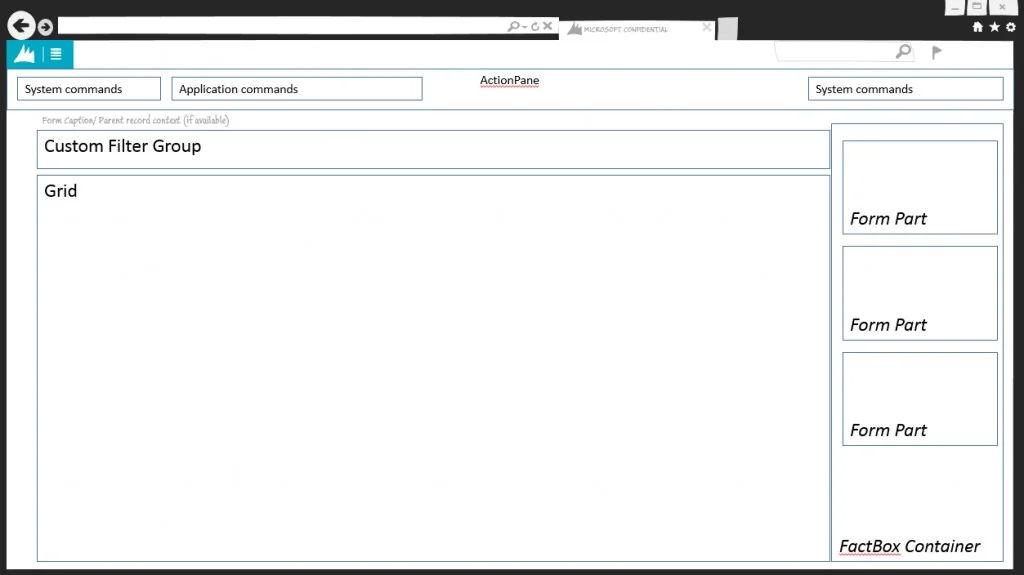
Scenario: Requirements. Business processes * A process named Populate check data must be designed based on the following: The process must run from the All customers list page and populate a custom table named CustCheckData with 1000 rows. The table must have two fields named CheckNumber and BankNumber. The process must return to the current session after the data is processed. *-> The generated check data must be available for users to access in a tabular form without additional details and preview panes. A: Details Master form pattern A details form is the primary method for entering data. A details form is the primary method for entering data. These forms let the user view, edit, and act upon data. All content on these form types is structured into FastTabs that can be expanded and collapsed, so that multiple FastTabs can be open at the same time. The FastTabs can contain fields or a grid, and each FastTab can have a local toolbar. Two patterns are described in this Detail Master - This is the basic Detail Master pattern. This is the pattern that you should use by Detail Master w/ Tabs - You should use this pattern when an entity requires many FastTabs (more than 15) that can be grouped into categories. In both cases, the grid view is structured the same. C: Simple List form pattern This pattern is used to maintain data for simple entities. The Simple List pattern is used to maintain data for simple entities. Simple entities are entities that have six or fewer fields and no parent/child relationships. There are some exceptions where entities that have up to 15 fields are still considered simple entities. * List Page form pattern A list page presents a set of data on a UI that is optimized for browsing records, so that you can find and work with a specific record. A list page presents a set of data on a user interface that is optimized so that you can browse records, find the right record, and then take an action upon that record. The list page lets the user search, filter, and sort the data. FactBoxes on the right side of the grid show related data for the active record. Actions that are relevant to the record are located on the ActionPane at the top of the page. The use of this pattern is now discouraged when there is a 1:1 correspondence between the List Page and Details page. Current guidance is to use this pattern only in other situations, such as when list pages have no backing details pages or have multiple backing details page (for example, when project quotations and sales quotations are shown together in the same List Page). https://learn.microsoft.com/en-us/dynamics365/fin-ops-core/dev-itpro/user-interface/details- master-form-pattern https://learn.microsoft.com/en-us/dynamics365/fin-ops-core/dev-itpro/user-interface/list-page-
Topics
Community Discussion
No community discussion yet for this question.