
MB-500 · Question #144
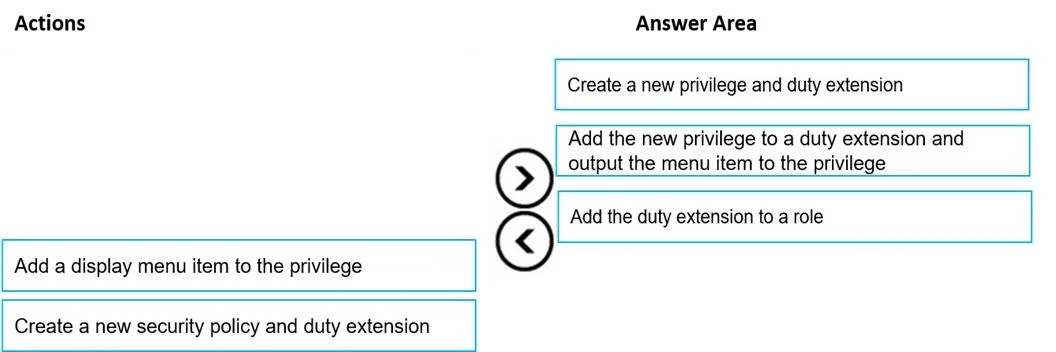
Drag and Drop Question A company uses Dynamics 365 Finance. A user is unable to access the new Customer Credit Limit report. You need to configure security for the report. Which three actions should…
The correct answer is Create a new privilege and duty extension; Add the new privilege to a duty extension and output the menu item to the privilege; Add the duty extension to a role. Dynamics 365 Finance Security Configuration - Explained The Security Hierarchy (Mental Model First) D365 Finance security flows top-down through four layers: `` Role → Duty → Privilege → Permission (on a securable object, e.g. a menu item) `` To grant access to a new report…
Question
Exhibit
Answer Area
Drag items
Correct arrangement
- Create a new privilege and duty extension
- Add the new privilege to a duty extension and output the menu item to the privilege
- Add the duty extension to a role
Explanation
Dynamics 365 Finance Security Configuration - Explained
The Security Hierarchy (Mental Model First)
D365 Finance security flows top-down through four layers:
Role → Duty → Privilege → Permission (on a securable object, e.g. a menu item)
To grant access to a new report, you build bottom-up: create the smallest unit first, then connect upward to the user-facing role.
Step-by-Step Breakdown
Step 1: Create a new privilege and duty extension
- A privilege is the container for permissions - it will hold the right to access the report's menu item.
- A duty extension is how you extend an existing duty without modifying Microsoft's baseline (overlay-free, upgrade-safe).
- You create both at this stage because neither exists yet. You cannot attach or configure anything until these containers exist.
- Why first? Everything else depends on these objects existing.
Step 2: Add the new privilege to a duty extension and output the menu item to the privilege
- This step does two things simultaneously:
- Adds the report's output menu item (the securable object) to the privilege - this is the actual permission granting read access to the report.
- Connects the privilege to the duty extension - so the duty now includes the right to run this report.
- Why second? You can only wire up objects that already exist (from Step 1). This is the configuration step that establishes all the relationships.
Step 3: Add the duty extension to a role
- Roles are what get assigned to users. By adding the configured duty extension to a role, any user with that role inherits the duty → privilege → permission chain.
- Why last? You must have a fully configured duty before assigning it. Assigning an empty or incomplete duty does nothing.
Why the Distractors Are Wrong
| Distractor | Why it's wrong |
|---|---|
| "Add a display menu item to the privilege" | This describes only half of Step 2 and omits connecting the privilege to the duty. It's a trap for people who memorize partial steps. |
| "Create a new security policy and duty extension" | Security policies control row-level/data access (e.g., "only see your own legal entity's records") - not report visibility. Using a policy here solves the wrong problem entirely. |
Common Mistakes
- Reversing Steps 1 and 2 - You cannot add a privilege to a duty that doesn't exist yet. Order matters.
- Skipping the duty extension and trying to add a privilege directly to a role - roles reference duties, not privileges directly.
- Confusing security policies with privileges - Policies = data filtering; privileges = UI/feature access.
Topics
Community Discussion
No community discussion yet for this question.